
New feature6 minute read
Front desk and manager logins: give each person on your team the access they need
Every login on FullDiary is now diary only, front desk or manager, chosen when you invite someone and changed under Edit, Access. Two switches narrow a login further: their own column only, for somebody renting a chair, and hidden contact details. And everyone gets a profile of their own.

Director, FullDiary
A shop with one chair runs on one login. A shop with four chairs, a receptionist and a manager does not, and until now the choice on FullDiary was the owner's password or a diary-only login. FullDiary is the booking system for UK small businesses, with invoices and quotes built in, and from today each person on your team gets the login they need and no more.
Seven kinds of login
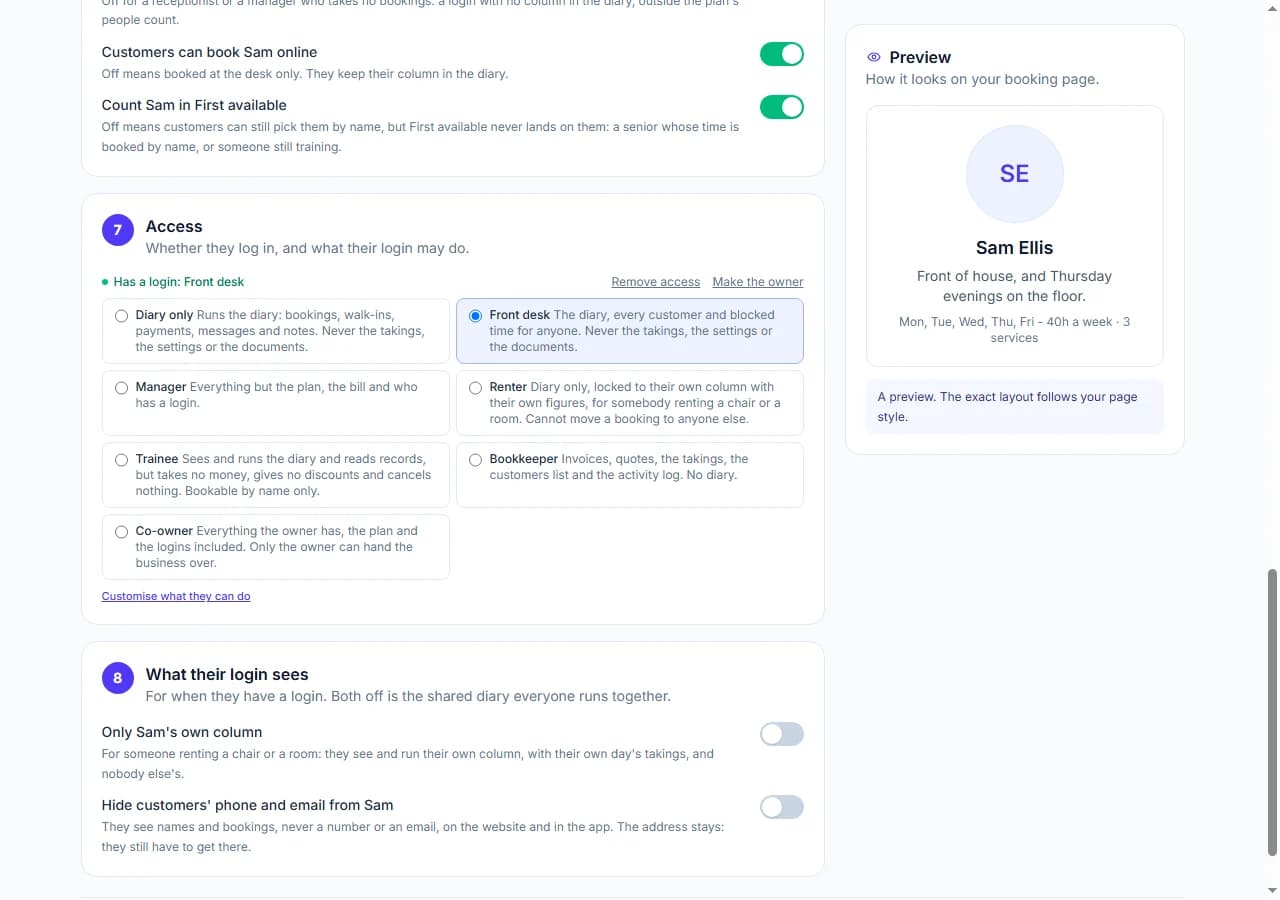
- Diary only. Runs the diary: bookings, walk-ins, moves, marks, messages and notes, and can block their own time off. Never the takings, the settings or the documents.
- Front desk. The diary, every customer and blocked time for anyone, for the person who answers the phone. Still never the takings, the settings or the documents.
- Manager. Everything but the plan, the bill and who has a login: services, hours, people, the booking page, invoices, quotes and the takings.
- Renter. Diary only, locked to their own column with their own figures, for a barber renting a chair or a therapist renting a room. They cannot move a booking to anyone else.
- Trainee. Sees and runs the diary and reads records, but takes no money, gives no discounts and cancels nothing. Bookable by name only.
- Bookkeeper. Invoices, quotes, the takings, the customers list and the activity log, and no diary at all.
- Co-owner. Everything the owner has, the plan and the logins included. Only the owner can hand the business over.
- Owner. You. The plan, the bill and every login stay yours, and only you can hand the business to somebody else.
The role is a starting point
Each role pre-ticks what that login can do, and the ticks are yours to change for one person. Open Edit on their card, go to Access and press Customise, and every permission is a tick: the diary, cancel and no-show, moving bookings to another person, blocked time for anyone, messaging customers, visit records and notes, taking payments, discounts and vouchers, the takings, invoices and quotes, the customers list, deleting customers, Your shop, classes, settings and the activity log. Untick Discounts and vouchers for a junior on the desk. Tick The customers list for a diary-only login who answers the phone on Saturdays. The role stays on the card as the name of where they started, and changing it starts again from that role's ticks.
Two things are never ticks, whatever the role: the plan and the bill, and who has a login. Those belong to you and to a co-owner, and to nobody else.
You choose when you invite somebody, under Edit, Access on their card under People, and the choice sits there afterwards, so a receptionist who becomes a manager is one change, not a new login. The website, the FullDiary app and every door in both follow the same rule: a front desk login never sees a settings page, and a diary-only login never sees a dashboard.
Two switches for the awkward cases
Some people on a team are not employees. A barber renting a chair, a therapist renting a room on Tuesdays: they want their own column and nothing else, and the shop wants it that way too. Tick Only their own column on their card and their login sees and runs their own column, with their own day's figures, on the website and in the app alike. Nobody else's bookings reach them.
The other switch answers the oldest worry in the trade: a stylist leaving with the client list. Hide customers' phone and email, and that login sees names and bookings but never a number or an address book. It cannot edit a customer's details either, because a form showing blanks would save blanks. The address itself stays, because a mobile hairdresser still has to get to the house.
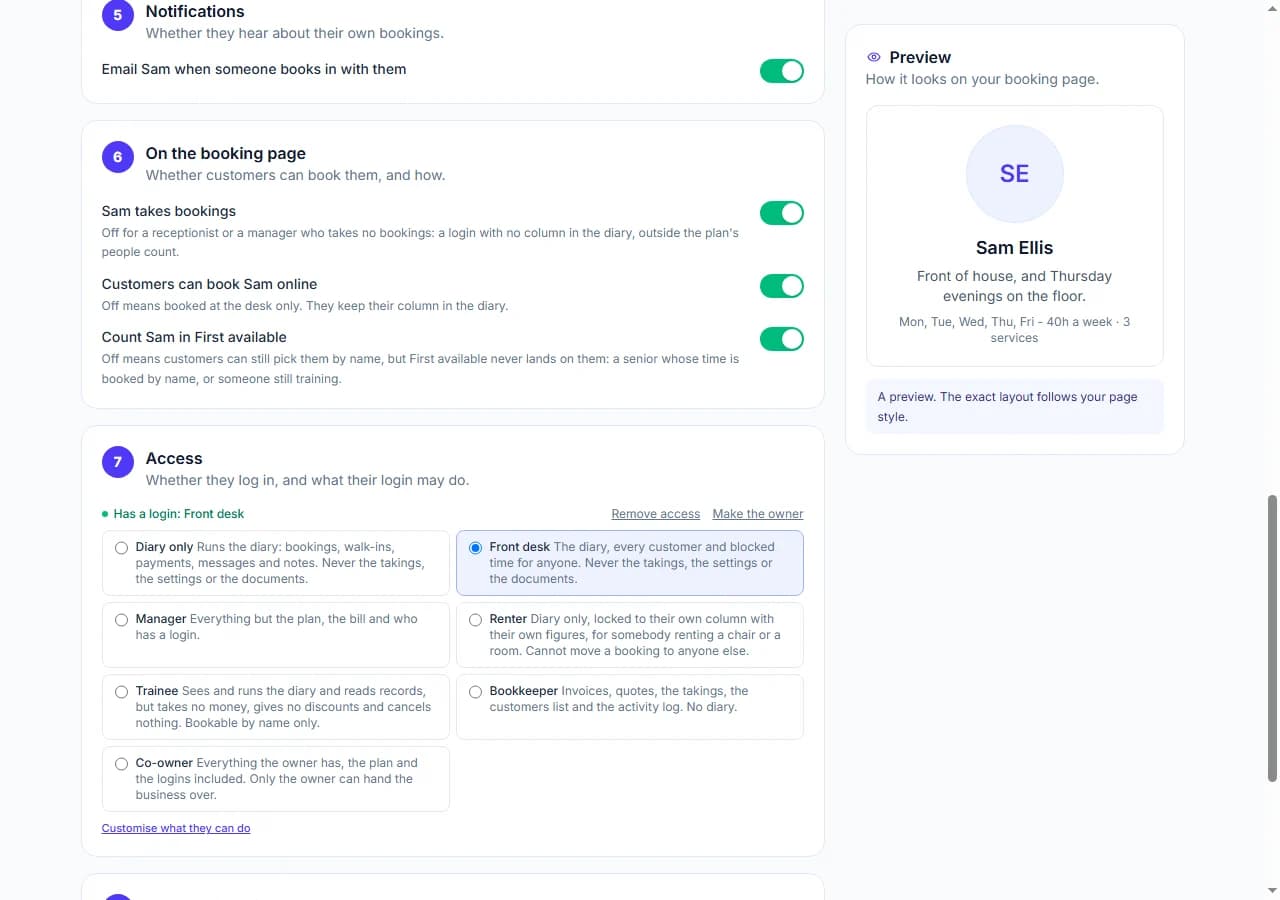
Three more switches say how customers can book a person. Takes bookings off is a login with no column at all, so a receptionist or a manager who takes no appointments is not counted as a bookable person and never appears on your booking page. Bookable online off keeps somebody in the diary but books them at the desk only. Count in First available off means customers can still pick them by name, but the First available choice never lands on them: for a senior whose time is booked by name, or somebody still training.
Everyone gets a profile
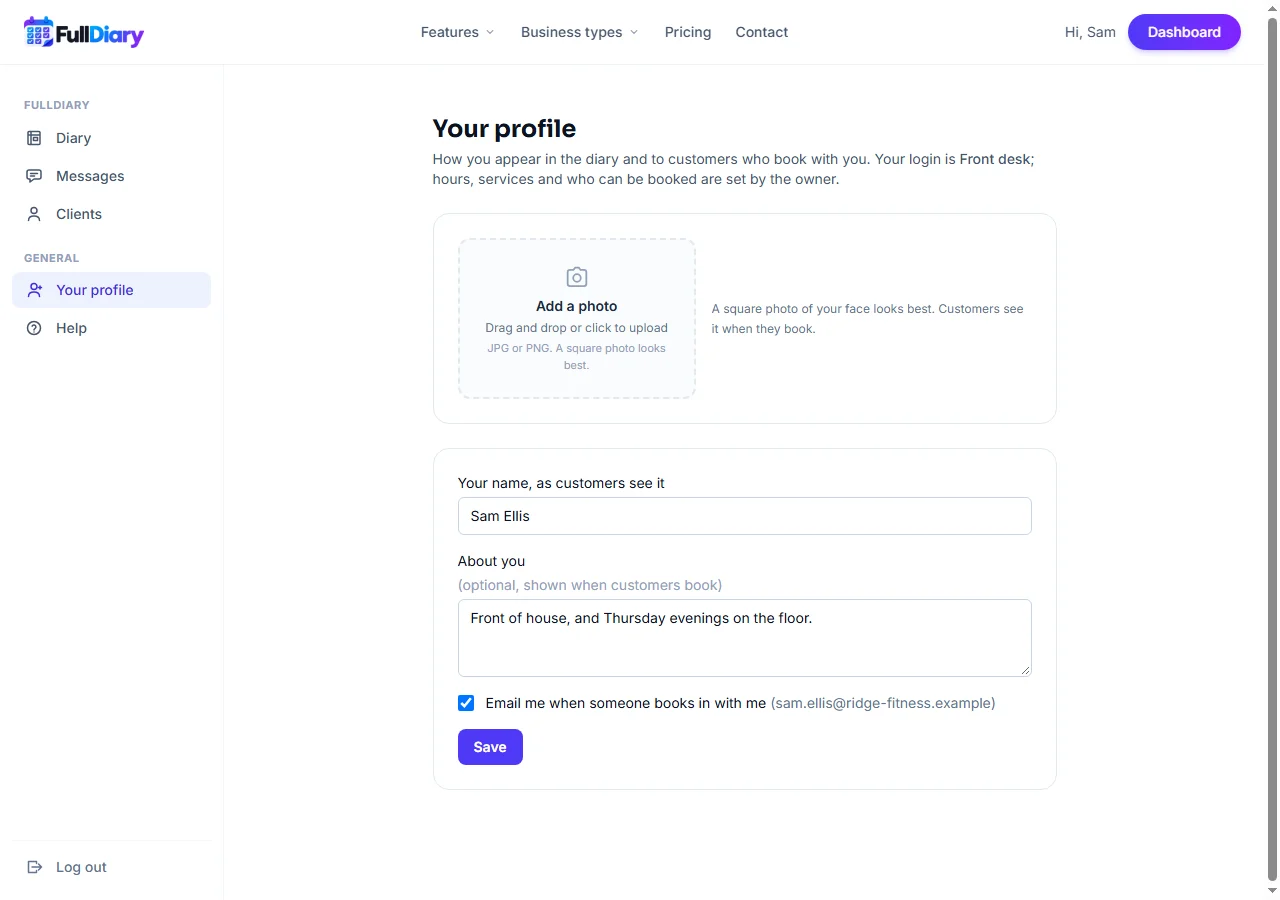
Every login with a column in the diary gets Your profile: their name as customers see it, their photo, the line about them on the booking page and whether they are emailed about their own bookings. Hours, services and the booking-page switches stay under People, because those change what the shop sells. In the app it sits under Settings and in More.
Who did what
With several logins in one diary, the activity log now names the person: Sam cancelled a booking, Alex moved one. Your own hand still reads as You. It is the first thing to open when a customer says nobody told them.
Handing the business over
If the business changes hands, Make the owner on a login's card makes them the owner and your login a manager. The plan and the bill belong to the business, so nothing about them moves.
How to switch it on
Open Your shop, then People and places, press Edit on somebody's card and go to Access: press Invite to log in, pick diary only, front desk or manager, and send. For a login that already exists, the role and Customise are in the same place. The switches are under Edit too, in the On the booking page and What their login sees sections. Logins come with Pro, priced per person: £9.99 a month each and never more than £39.99 a month however big the team, with a login that takes no bookings counted like any other person.
The help answer on staff logins
Questions people ask
- Can a manager see the bill or change the plan?
- No. The plan, the bill and who has a login are the owner's alone. A manager runs everything else, including the takings and the documents.
- Does a receptionist count as a person on Pro?
- Yes, a login is a person whatever it may do. What a receptionist does not take up is a column: switch Takes bookings off and they are not counted against the number of bookable people on your plan and never appear on the booking page.
- Can a self-employed renter see their own takings?
- Yes. With Only their own column on, their diary shows their column alone and the banner above it counts their bookings and their day's value, nobody else's.
- What happens to the client list when somebody leaves?
- Remove access under Edit, Access and their login is gone that moment; their appointments stay in the diary. If you would rather they never saw numbers at all, Hide customers' phone and email does that from the day they start.
Read next
Written by
Matt SucklingDirector, FullDiary
Matt runs Cynical Software Ltd, the Perthshire company that makes FullDiary, and builds it.