
Online booking system for massage therapists
The simple booking system for massage therapists.
Clients book themselves in while your hands are busy, the intake form arrives before the first visit, deposits hold the hour, and the day runs back to back without the phone breaking the quiet.
- Reduce no-shows
- Set up in minutes
- Get more bookings
Free for 20 bookings a month. No card, no contract, no commission.
Oiled hands cannot text back
Hands full for an hour, phone full all day
Massage sells calm by the hour, and the admin around it is anything but. Every message answered between clients is the quiet broken twice.
Enquiries you cannot answer
Bookings arrive while your hands are oiled and your phone is across the room.
A no-show is a whole hour
The room warm, the couch dressed, the hour held.
Regulars who drift
The client who swears by a monthly massage books ten weeks late. Rebooking before they leave is the difference.
Try it
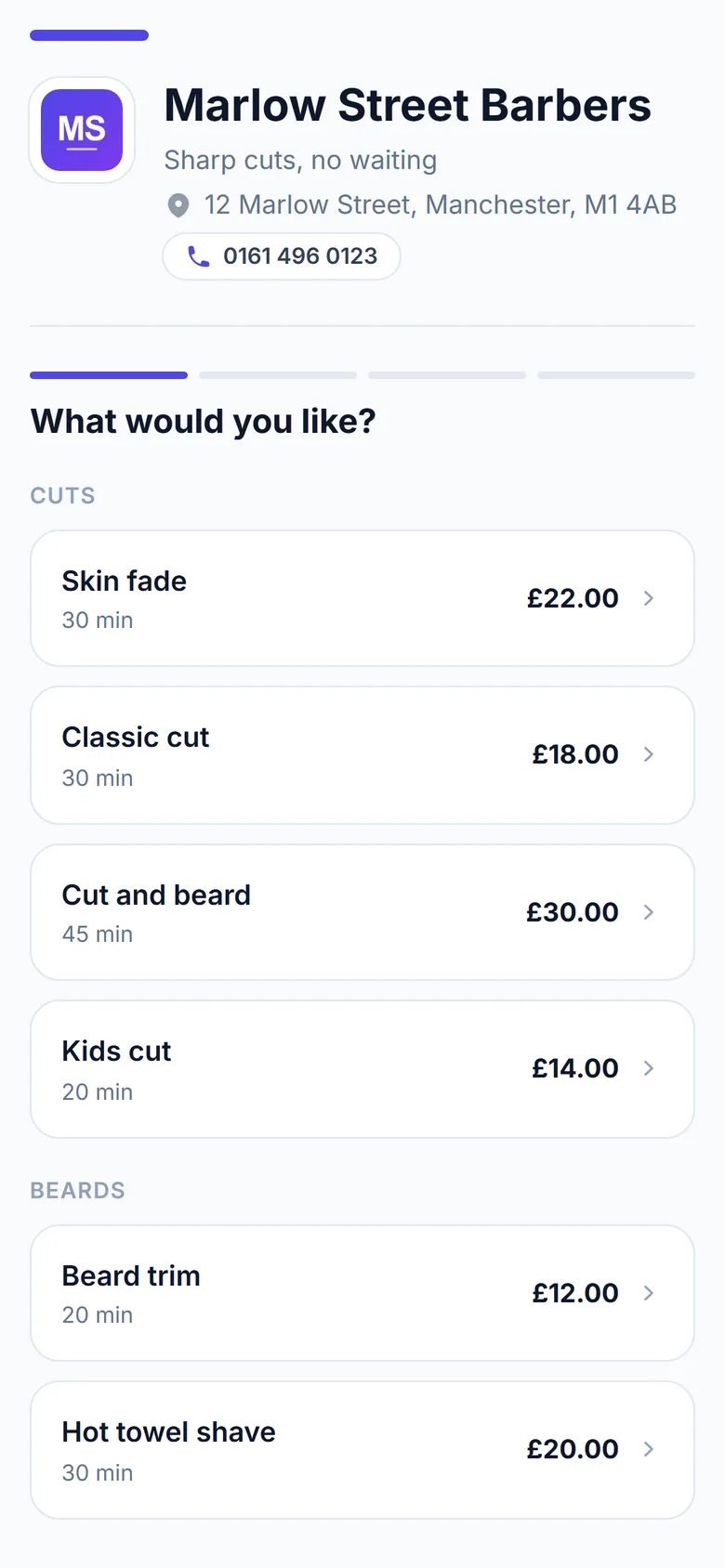
Book yourself in, the way your clients will.
Four taps on the phone, and watch the booking land in the diary beside it. That is all your clients see: no app, no account, no password to invent.
Stillwater Massage
7 Charlotte Street, Perth
What would you like?
Booking by FullDiary
The treatment room's diary, Mon 28
What the treatment room seesBook on the phone and watch it land here. Nothing is saved - it is a picture of the real thing.
The diary
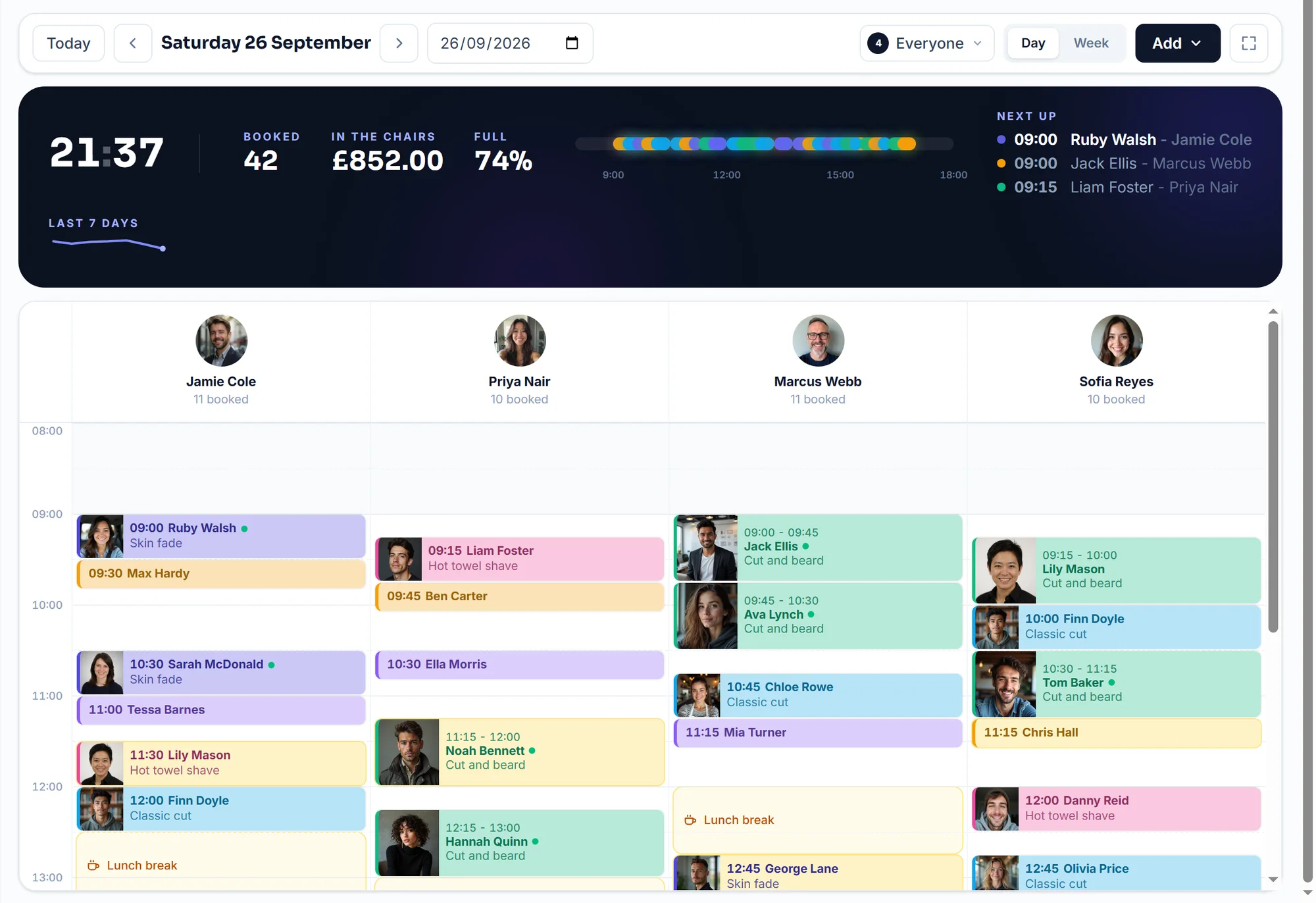
The screen your treatment room lives on.
Every therapist is a column, a 75-minute deep tissue holds its real 75 minutes, and free times are offered from the end of the last appointment so nothing strands a half hour.
Someone running late? Drag their booking to another column or time and drop it. The diary updates and the customer gets the new time by email. (A real screen recording.)
- Drag a booking to a new time - the emails follow it
- Draw across an empty space to book a walk-in
- Done, no-show or cancelled, marked as you go
- One tap makes it full screen for the tablet by the till
Set up in minutes
Three steps and you are taking bookings.
- 01
Answer six quick questions
Pick your trade on screen one and the services, hours, forms and words massage therapists use come filled in. Change anything, then go live.
- 02
Share one link
In your bio, on WhatsApp, or as a printed QR card. Your clients only ever see times that are genuinely free.
- 03
Run the day in the book
Every booking lands in the live diary. Drag to move, draw to add a walk-in, mark done as the day goes.
Filled in for massage therapists on screen one
- Swedish massage, deep tissue and sports massage, each timed and priced
- The intake form, asked before the first visit
- What was worked on and notes for next time on every visit record
- A course of five, sold on your booking page
- Hour-long sessions on a diary that offers times from the end of the last one
Every one of these is a starting point. Change the prices, the hours or the words on the screen where they live, and the booking page updates as you type.
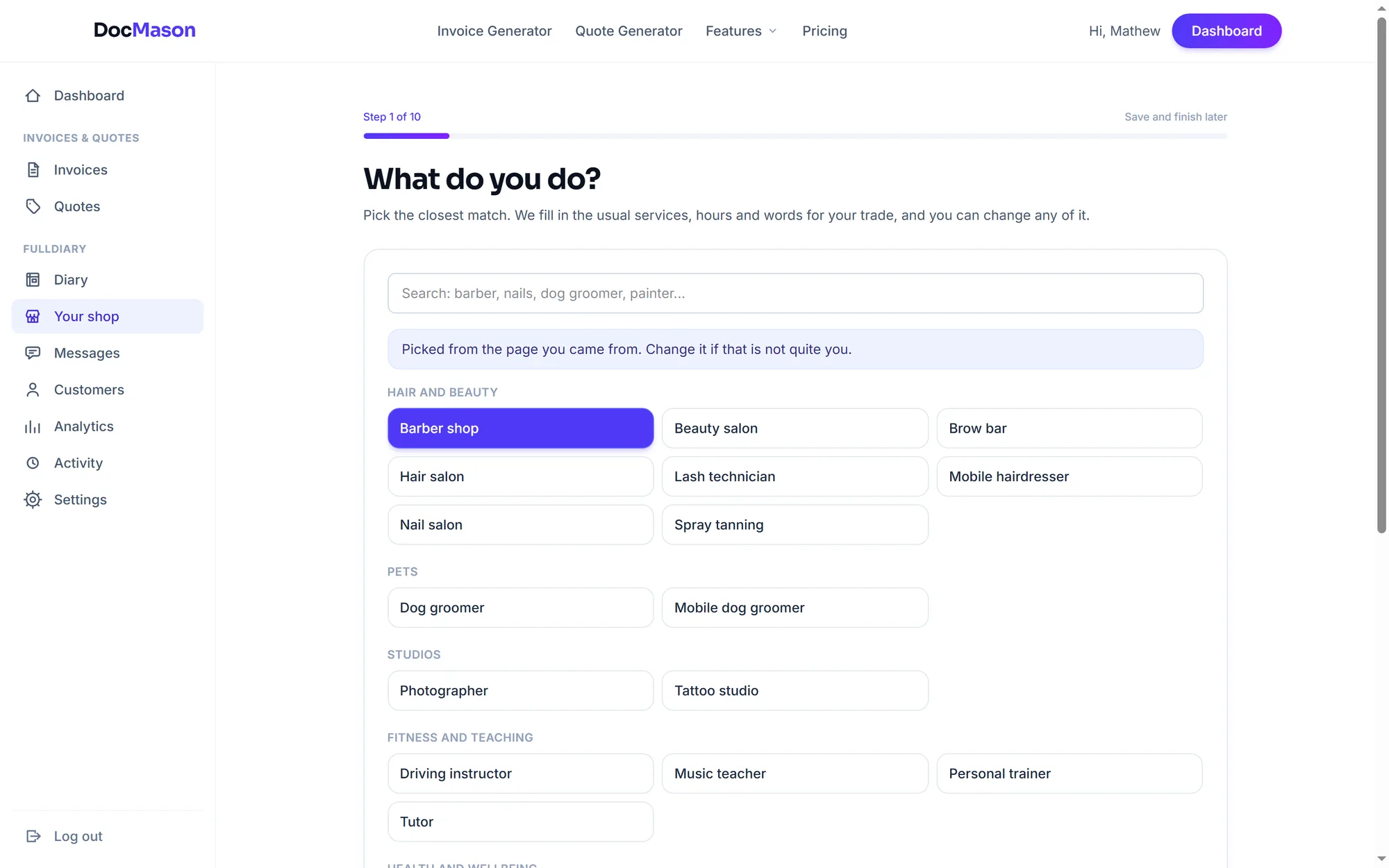
Six questions with massage therapists' answers filled in. Live in minutes, no card.
What comes with it
Everything FullDiary handles for massage therapists.
Before they arrive
- The intake form, before the first visitInjuries, history, medication and consent, asked on the booking page with a typed name. On the profile with a PDF.
- Deposits that hold the hourA deposit or the full price as they book, through your own Stripe account. The slot is confirmed once it is paid.
- Reminders that keep the couch fullThe day before and the morning of, by email, and by text on Pro. Clients move their own booking from the confirmation.
- Mobile? The address arrives firstEvery mobile booking comes with the doorstep, a maps link and travel time between clients, and on Pro your price per mile.
On the day
- No dead gaps between treatmentsTimes are offered from the end of the previous appointment, so a 75-minute treatment never strands a half hour.
- What was worked on, on fileFill in the visit record from the diary card and it is there at the next session.
- Messages, both waysRunning late? One tap. They reply from their booking page and it lands in your inbox.
- A QR card for the way outPrint it from your dashboard and stand it by the door. They book the next one while the calm is still working.
After
- A course of five, paid up frontSold on your booking page through your own Stripe. Each session comes off it and the client sees the balance.
- The monthly regular, on repeatSet a regular's slot to repeat every four weeks and the diary keeps it topped up.
- A nudge when the next one is dueOne email with a link to book, and a review ask after the visit with your Google link.
Every feature above is live today, and because invoices and quotes are built in, they are on the same login. See every feature.
Forms
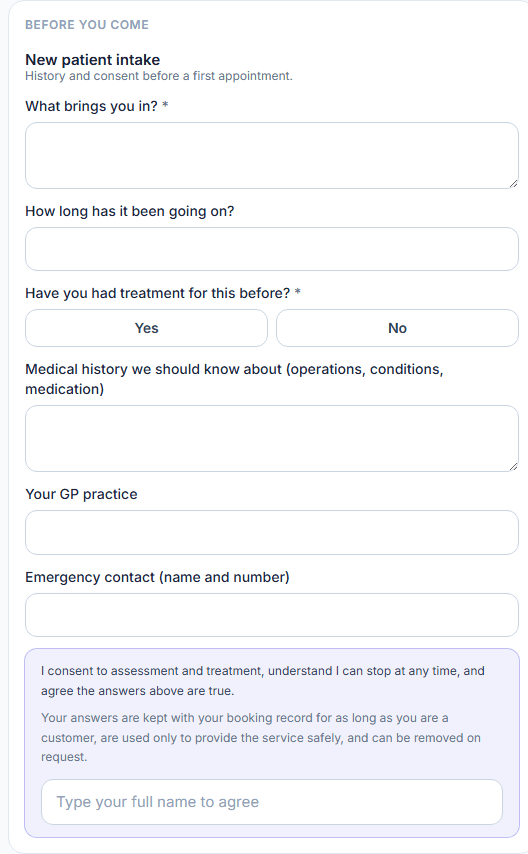
The intake form, answered before the first visit
The massage setup adds the intake form and asks it on the booking page before a first visit: what brings them in, injuries, medical history and medication, with a typed-name agreement. The answers sit on the client's profile with a PDF, and the diary card shows who has done theirs.
- Asked on the booking page, before the first appointment
- The answers sit on the client's profile with a PDF
- Inside the validity window they are not asked again
Travel charges
Mobile therapist? Get paid for the drive
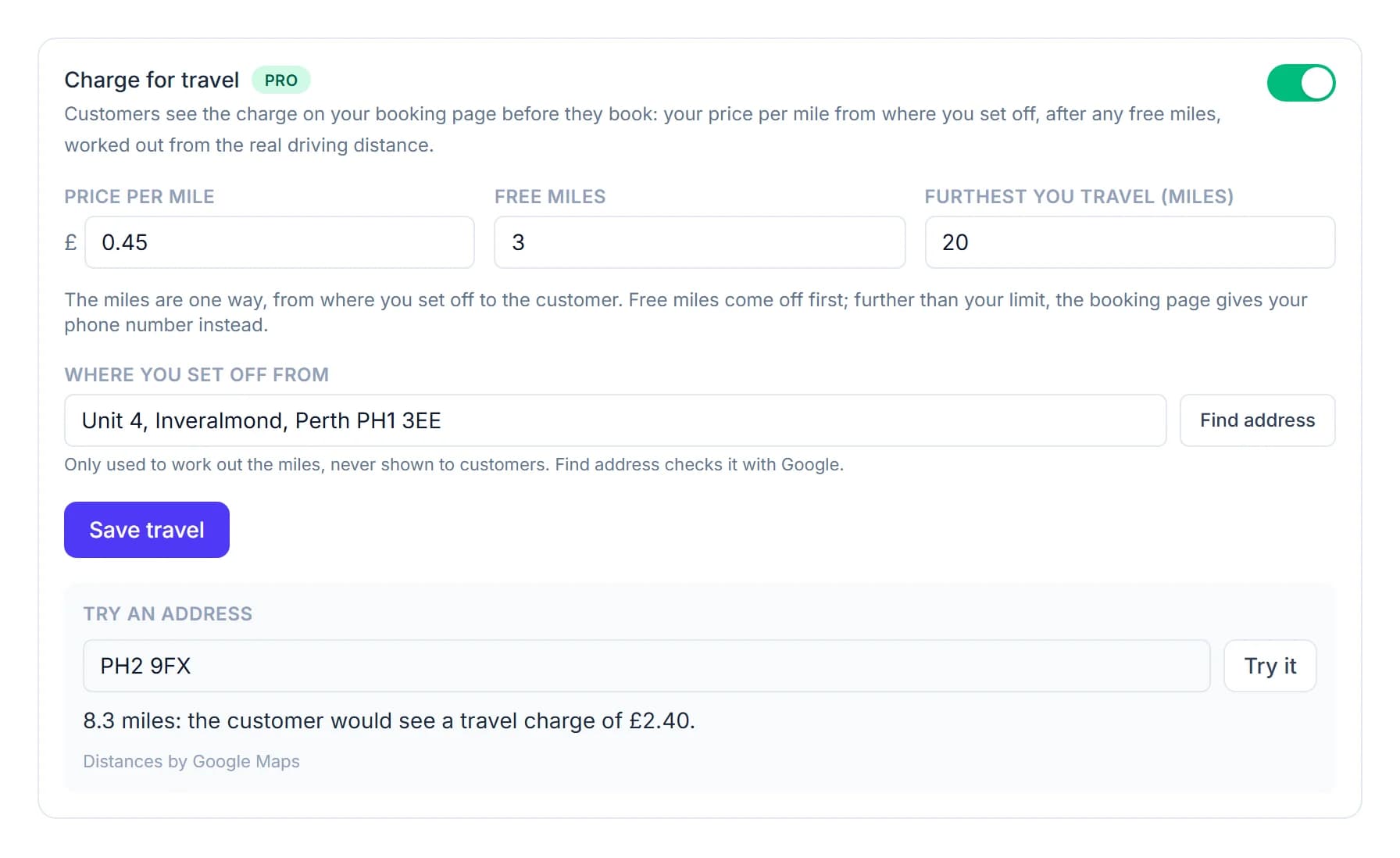
If you take the couch to your clients, the drive is part of every booking. On Pro, set your own price per mile after any free miles, and FullDiary works out the real driving distance to each address and adds the charge before the client confirms. Also see clients in a room? Price home visits as their own service instead.
- Your rate, your free miles, and the furthest you travel for online bookings
- Clients see your rule from the first step, and the charge before they book
- Change it, take it off or work it out again from the diary
Their side
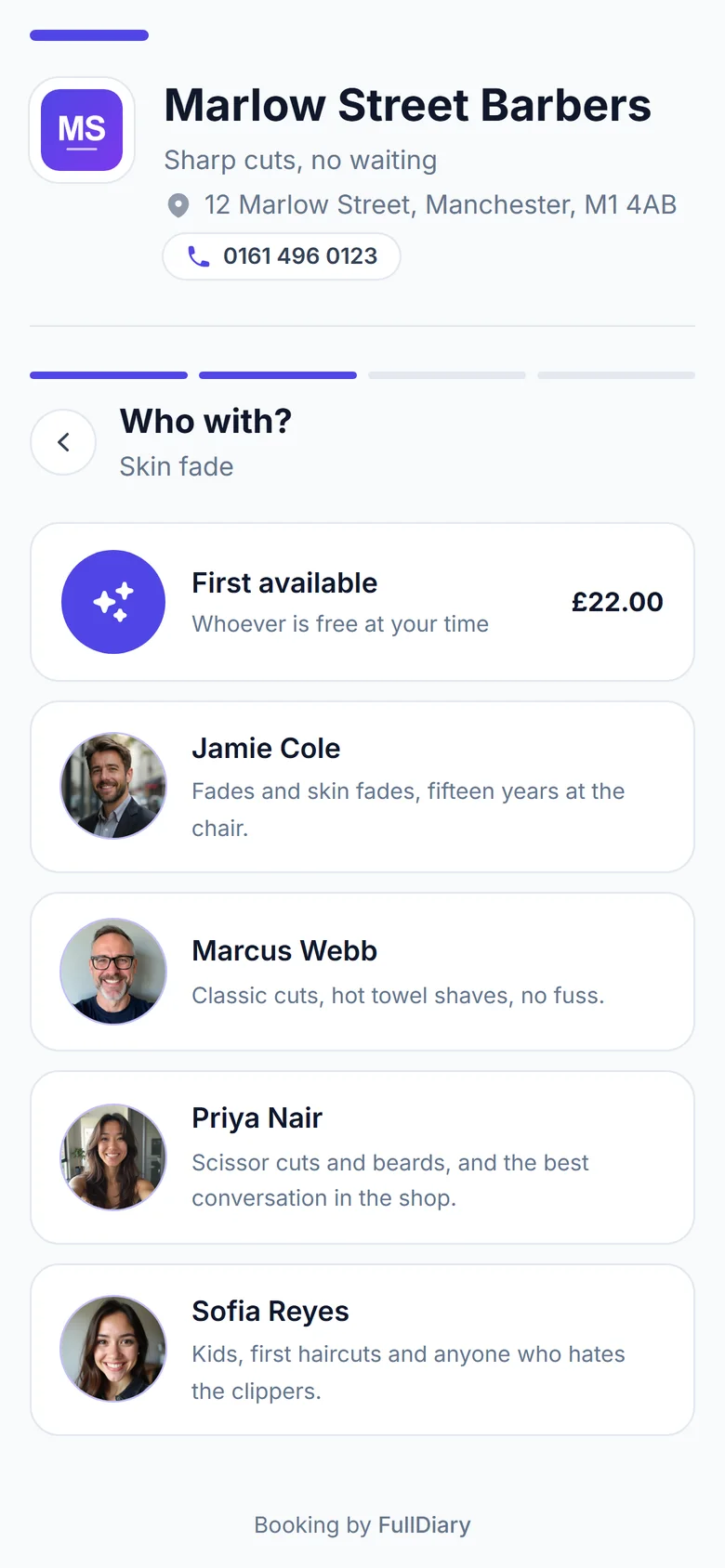
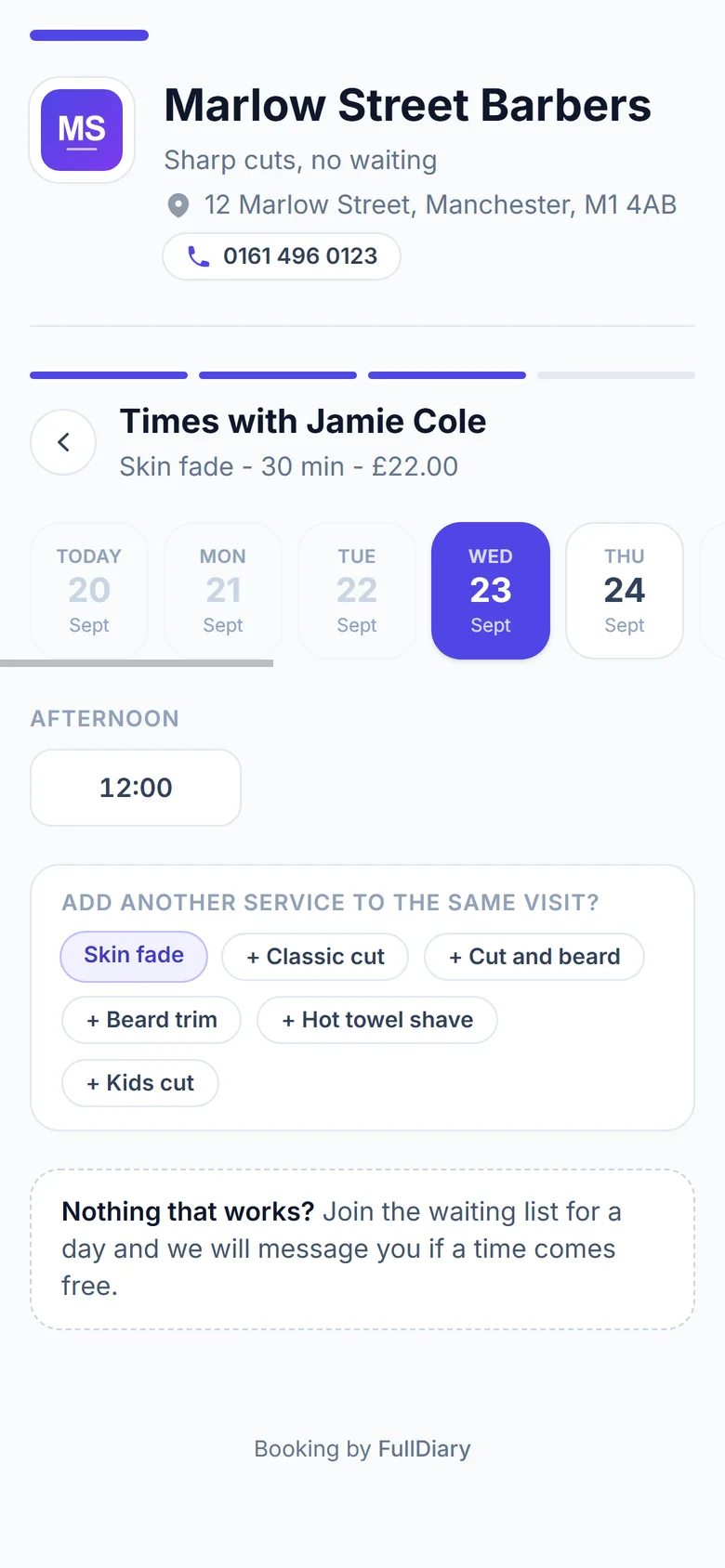
Your page, on your clients' phones.
Your name, your services, your prices, in your colours. This is what opens when one of your clients taps the link in your bio or scans your QR card. No app, no account, booked in under a minute.
- Real times, not requests: slots come from the live diary's actual gaps
- Nothing to download and no password to invent
- Confirmation lands by email, with add-to-calendar and a link to move it
Businesses using FullDiary
Built for people who are busy running a business.
"FullDiary makes managing bookings simple, organised and completely stress-free."
"Finally, a booking system that doesn't feel complicated. I set everything up in 5 minutes and my clients were booking straight away."
"Our customers love booking online, and we love the simplicity."
Switching is simple
Already using a booking system?
Switch in a few minutes.
Bring your customers with you, answer six quick questions and share your new link. No retyping, no starting again.
Bring your customers
Export your list from your old system and drop it in. We match up the columns and show you before anything imports.
clients.csv
312 customers
- Client nameName
- MobilePhone
- EmailEmail
Works with exports from Fresha, Booksy and spreadsheets.
Set up your page
Six quick questions: what you do, your hours, your services and prices, then go live and make it look like yours.
- Skin fade30 min£22
- Kids cut20 min£14
- Beard trim15 min£10
- + Add a service
Start taking bookings
Share your link on Google, Instagram and WhatsApp, and customers start booking themselves in.
Free to start, no card required.
Why FullDiary
Your business. Your customers. Your money.
No commission.
Keep what you earn. FullDiary doesn't take a percentage of your bookings.
No marketplace.
Customers book directly with your business.
Your customers stay yours.
No competing businesses or marketplace listings getting in the way.
Simple pricing.
One simple monthly price. No surprise booking fees.
Simple pricing
Start free. Upgrade when you need to.
No commission. No contracts. No surprise booking fees.
A therapist on their own starts free and moves to Pro when the book passes 20 a month. Pro is 9.99 GBP a month a person, never more than 39.99 GBP for the whole treatment room, each therapist with their own login, and adds courses of five paid up front.
Free
£0 forever
20 bookings a month
- Booking page
- Live diary
- QR card
- Reminders
- Messages
- Forms
- Customer import
Pro
£9.99 a person, a month
Never more than £39.99 a month, however big the team
Everything, for you and your whole team.
- Unlimited bookings and stores
- As many people as you need, each with their own login
- 50 text reminders a month for each person
- Packages, discount codes, gift vouchers, gallery and social links
- Unlimited invoices and quotes, card payments and QuoteChaser
- Send with your own branding
- Priority support
Every plan starts free. No card required. No commission on any booking, ever. See the full comparison
FAQs
Questions from massage therapists, answered straight
What it costs, what your clients see, and how FullDiary fits the way massage therapists actually work.
Something else on your mind? Ask a human.
Can I take a deposit on the long treatments only?
Yes. Deposits are per service, so a 90-minute hot stones can ask for a hold while a 30-minute back and shoulders stays deposit-free. Deposits charge through your own connected Stripe account and FullDiary takes no commission.
Can clients tell me about injuries before they arrive?
Yes. The massage setup adds the intake form and asks it on the booking page before a first visit: what brings them in, injuries, medical history and medication, with a typed-name agreement. The answers sit on their profile with a PDF, the diary card shows who has done theirs, and inside the validity window they are not asked again. Free on every plan.
Can I sell a course of five?
Yes, on Pro. A package is a set of sessions paid up front, sold on your booking page through your own Stripe or at the desk from the client's profile. Each session they book comes off it automatically, and their own page shows the balance.
I go to my clients. Can I charge for travel?
Yes, on Pro. Under Your room, Booking rules, switch on 'Ask for the customer's address when they book', then Charge for travel on the Travel card under it: your own price per mile, any free miles and the furthest you travel. The client sees the charge before they book, worked out from the real driving distance to their address. It applies to every online booking, so if you also see clients in a room, price home visits as their own service instead.
Do odd-length treatments leave gaps?
No. FullDiary offers times from the end of your previous appointment rather than from a fixed grid, so a 75-minute deep tissue is followed by the next free time, back to back.
What does it cost?
Free for 20 bookings a month with the booking page, live diary and QR card included. Pro makes bookings unlimited and adds more staff, more stores and packages, at 9.99 GBP a month a person, never more than 39.99 GBP. Reminder emails, the intake form, messages and a standing monthly slot are on every plan. No commission on bookings, ever.
Is it really free to start?
Yes, and it is not a trial. Twenty bookings a month, with the booking page, the live diary and the QR card included, for as long as you like. No card, nothing expires, and there is never commission on bookings. Pro is 9.99 GBP a month a person, never more than 39.99 GBP, when you outgrow it.
Do my clients need an app?
No. Your booking page is a link. It opens in their browser, they pick a service and a time, and the confirmation lands by email with an add-to-calendar file. Nothing to install on either side, and no password for anyone to forget.