
New feature4 minute read
Moving from Bookwhen? Your customers, passes and class bookings come with you
Export your customers and attendances from Bookwhen and import them. Everyone arrives with their details and booking form answers, passes keep the classes left on them, and every booked place lands in the right class in your diary.

Director, FullDiary
FullDiary is the booking system for UK small businesses: an online booking page, a diary, reminders, classes and passes in one place. Moving from Bookwhen means bringing three things with you: your customers, the passes they have already paid for, and the places they have already booked. All three come across.
Two exports from Bookwhen
In Bookwhen, open Customers, click Search with nothing filled in so everyone is listed, then Options and Export customers. Then open Bookings, set the Start date to today and the End date to the last day you have classes booked, click Search, then Options and Export attendances. Upload both straight from the download, not copies saved from Numbers or Excel. You do not need the Bookings export: it holds the money taken, not who is booked on which class.
Your customers, with their answers
On Customers, choose Import customers, pick Bookwhen from the list of systems, then the customers file. Bookwhen's own columns are read for you, and so are the questions on your booking form, whatever you asked: a mobile number becomes their phone, a next of kin becomes their emergency contact, and every other answer, a health questionnaire, an injury, a dog's name, is kept as a private note on their profile. You see every column and can change any of them before anything is saved.
- Phone numbers that work. Bookwhen's export often drops the 0 from the front of a mobile number. FullDiary puts it back, so text reminders reach everyone.
- Customers since the start. The date of their first Bookwhen booking becomes the date they became your customer.
- Families stay together. When two people share one email, a parent and child say, both come across, and a note says who shares it.
- Nothing overwritten. Anyone already in your customers is matched by email. Details they were missing are filled in, and nothing they already have is changed.
Passes keep their classes
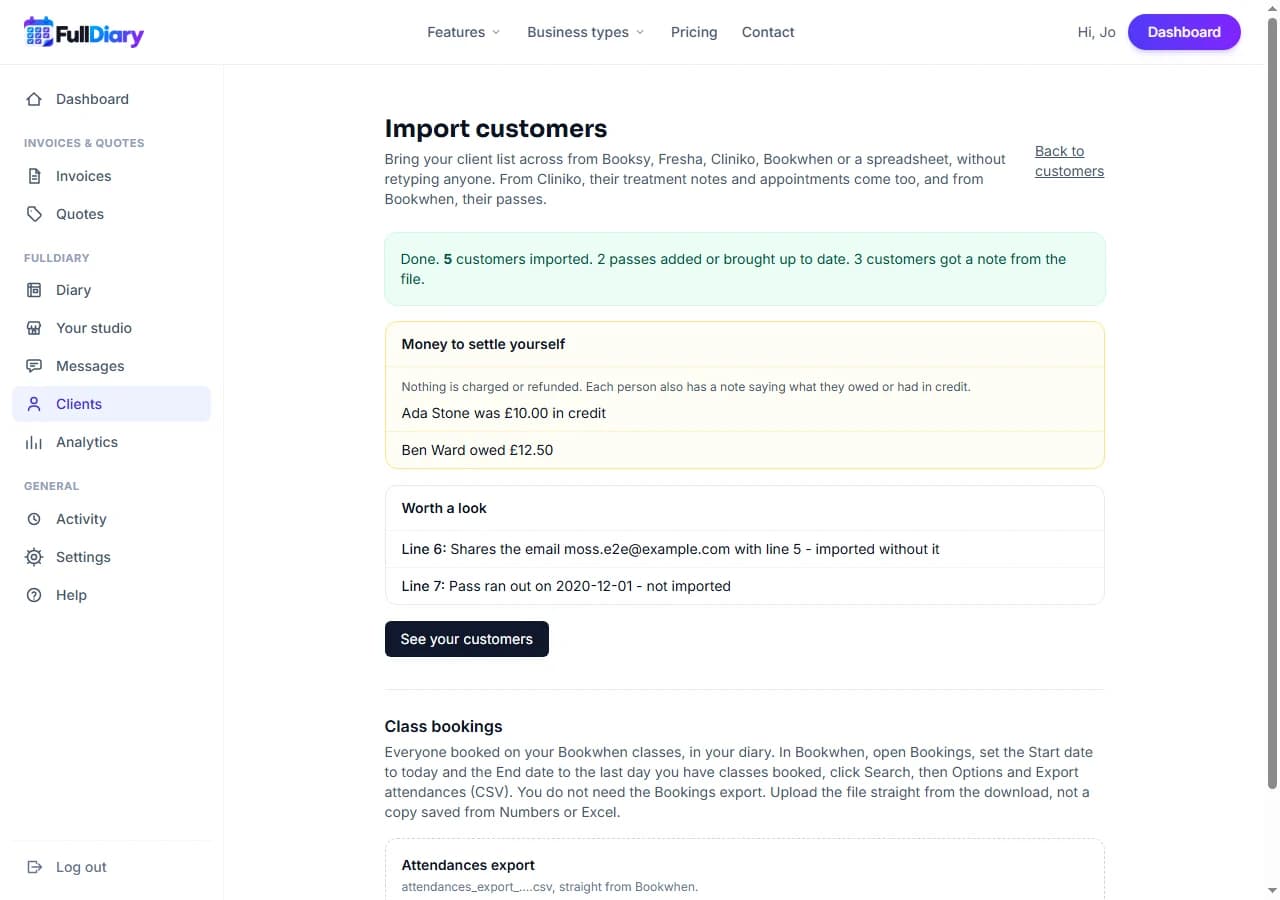
A pass bought in Bookwhen is money your customers have already paid. Each pass with classes left becomes a pass on their FullDiary profile, with the same number of classes left and the same end date, at no charge. You choose once what these passes pay for: any class, one class, or appointments. From then on, booking a class uses the pass up exactly as a pass bought in FullDiary does. A pass that has already run out is left out and listed.
Anyone who owed you money, or was in credit, in Bookwhen is listed at the end with the amount, and each has a note saying so. Nothing is charged or refunded: that is yours to settle.
Then the class bookings
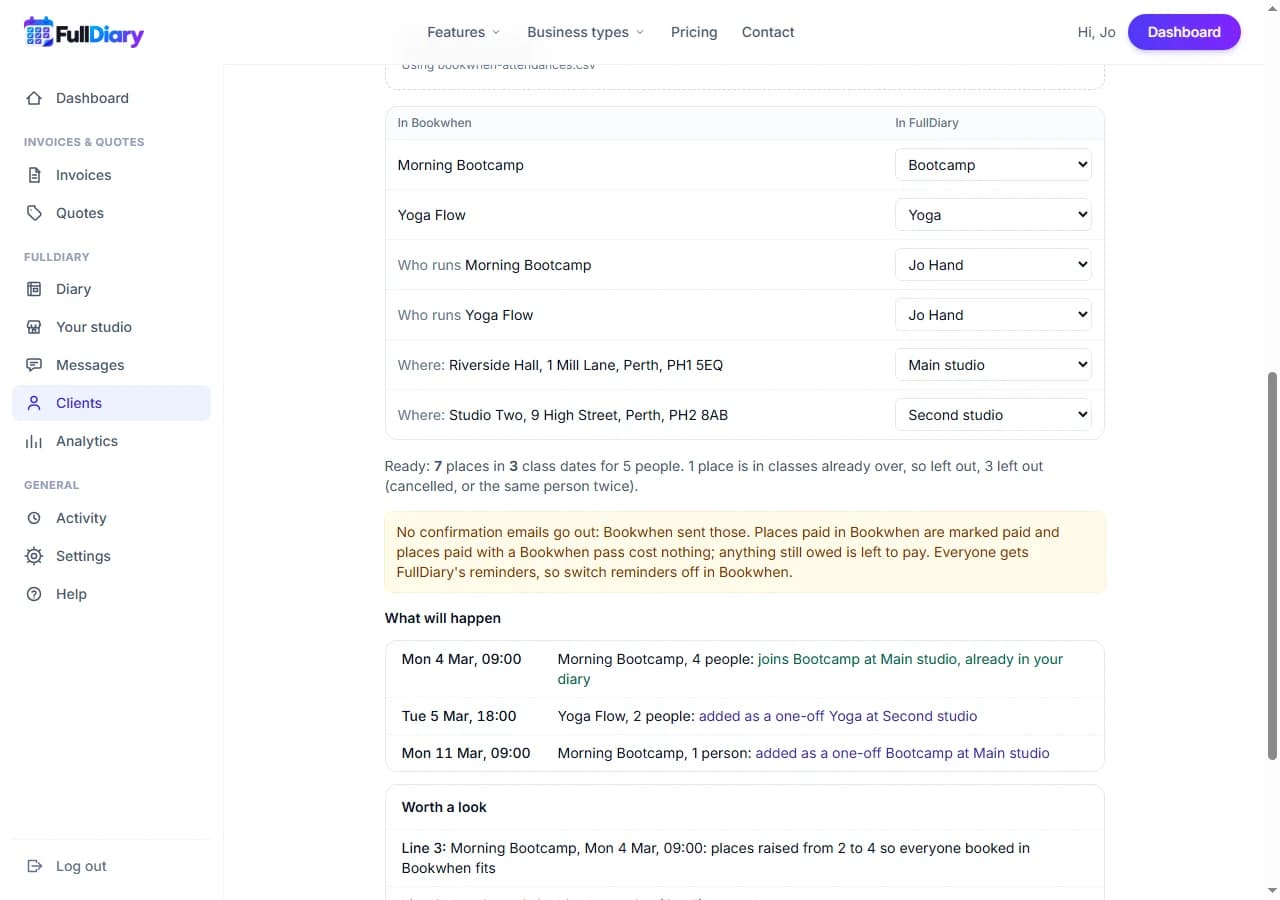
Under your customers is the Class bookings step. Choose the attendances file, then say which of your FullDiary classes each Bookwhen class is, who runs it, and which of your places each Bookwhen location is; a location with the same postcode as one of yours is picked for you. Press Check against your diary and you see every class date and what will happen to it before anything is saved.
- Your timetable fills. If you have already put your classes in the diary, each booked date joins the class that is there at that time. Any other date is added for that day, at Bookwhen's times.
- Everyone who paid gets in. If a class has fewer places left than people booked in Bookwhen, it is given more, and you are told.
- Paid stays paid. A place paid in Bookwhen is marked paid, a place paid with a Bookwhen pass costs nothing, and anything still owed is left to pay.
- Nobody is emailed. No confirmations go out, because Bookwhen sent those. Everyone gets FullDiary's reminders from then on, so switch reminders off in Bookwhen.
- Safe to run twice. Every place remembers where it came from, so running the same file again adds nothing.
Classes that have already happened are left out, so their history stays in Bookwhen.
Setting it up
Open Customers, then Import customers, choose Bookwhen and start with the customers file. If your customers are already in, choose Import class bookings only. Importing customers is on every plan; passes and classes are on Pro.
Questions people ask
- Do I need the Bookings export?
- No. It holds the money taken, not who is booked on which class. The Customers and Attendances exports are the two you need.
- What about a Bookwhen class I have not set up in FullDiary?
- Choose Leave out for it, or add the class under Your shop first and run the class bookings again. Places already in are skipped.
- Do my customers get emails when I import?
- No. Nothing is sent when you import. Their reminders come from FullDiary from then on, so switch Bookwhen's off.
- Which plan is it on?
- Importing customers is on every plan. Passes and classes are part of Pro, so bringing passes and class bookings across needs Pro.
Read next
Written by
Matt SucklingDirector, FullDiary
Matt runs Cynical Software Ltd, the Perthshire company that makes FullDiary, and builds it.