
New feature4 minute read
Moving a class booking: your customers change class without cancelling
Customers can now move a class booking to another class from their confirmation email, and you can move anyone from the diary. What they paid goes with them, to any class at any of your places, and a difference in price is paid or refunded for you.

Director, FullDiary
FullDiary is the booking system for UK small businesses, with classes, passes and an online booking page built in. Until now, a customer who could not make their class had one choice on their booking: cancel it, then book again and pay again. Now they move it.
Your customers move their own booking
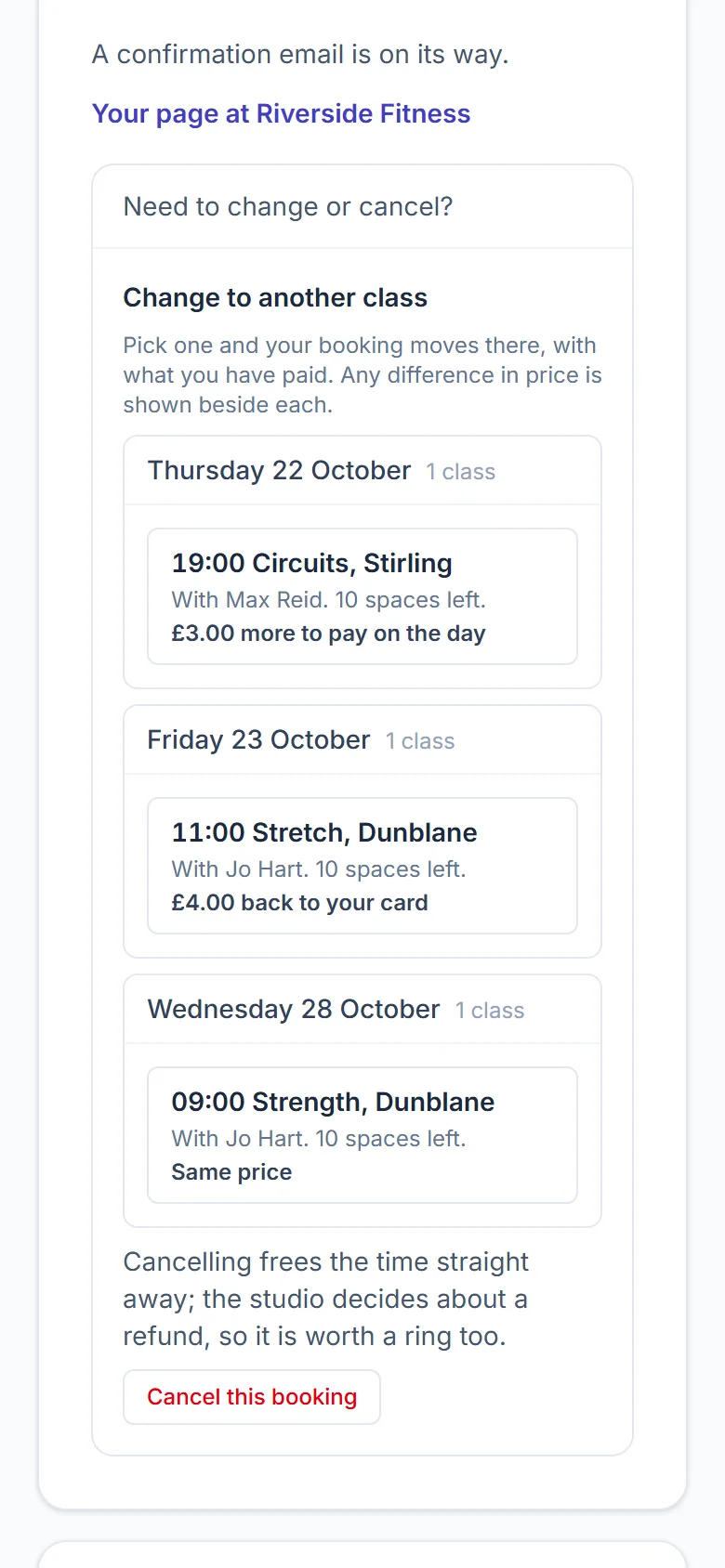
The confirmation and reminder emails for a class carry a Manage link. Under Need to change or cancel? it now lists the classes they could move to, by day: the time, the class, which of your places it is at, who runs it and how many spaces are left. Under each is what the move does to their money: Same price, £3.00 more to pay on the day, £4.00 back to your card, or On your pass. They press one and the booking moves.
- Any class, any place. Every class your booking page sells, at any of your places, not only another date of the one they booked. A full class, or one they already have a place in, is left out.
- What they paid comes too. The booking itself moves, so their card payment, gift voucher, discount, class pass and form answers stay with it.
- Your cancellation window still counts. Inside it the booking cannot be moved online, the same as cancelling, so they ring you.
- Everyone is told. They get an email with the new time and a calendar update that replaces the old entry, and their reminders follow the new day. You get an email saying who moved and where to.
- The space they left is not wasted. It is offered to the first person on that class's waiting list.
When the price is different
- A dearer class that takes payment when booking. They pay the difference by card first, and the booking moves the moment it is paid. If the class fills up while they are paying, the money goes straight back and they are told the booking has not moved.
- A dearer class paid on the day. The booking moves, and the difference is added to what they pay on the day.
- A cheaper class. The difference goes back to their card by itself, through your own Stripe. If Stripe cannot refund it, you are emailed to refund it by hand.
- On a class pass. If the pass covers the new class, the booking stays on it. If not, the class goes back on their pass and the new class is paid for like any booking.
Moving someone yourself
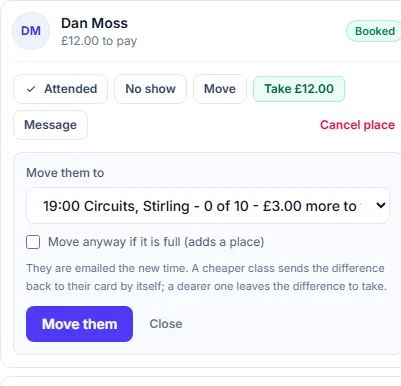
Open a class in the diary and press Move beside the person. Pick any class in the next twelve weeks at any of your places; each shows how full it is and what to take or give back. A full class takes them only with Move anyway, which adds a place. On a dearer class the difference is left for you to take with Take payment; on a cheaper one paid by card, it goes back to their card by itself. Move is on the website now, and comes to the FullDiary app in its next update.
Setting it up
There is nothing to switch on. Every shop with classes has it, and Change to another class appears on your customers' booking links straight away. How late they can move online is your cancellation time, under Your shop, Booking rules.
Questions people ask
- Does my customer pay twice if they move?
- No. The booking itself moves, with what they paid. They only pay more if the new class costs more.
- Can they move to a class at a different place?
- Yes. They can pick any class your booking page sells, at any of your places, as long as it has a space left.
- What happens if the new class is cheaper?
- The difference goes back to their card by itself, through your own Stripe. Money they paid you in cash is yours to hand back, and the diary tells you how much.
- Which plan is it on?
- Classes are part of Pro, and moving a class booking comes with them.
Read next
Written by
Matt SucklingDirector, FullDiary
Matt runs Cynical Software Ltd, the Perthshire company that makes FullDiary, and builds it.