
New feature4 minute read
Moving from Fresha? Your clients, services and appointments come with you
Download three files from Fresha and import them in one go. Your clients arrive ready for text reminders, a service you had once for each team member becomes one service with everyone's own time and price, and your upcoming appointments land in the diary.

Director, FullDiary
FullDiary is the booking system for UK small businesses: an online booking page, a diary, reminders and your customers in one place. Moving from Fresha means bringing three things with you: your clients, your services and the appointments already booked. All three come across from files you download from Fresha yourself.
Your clients
In Fresha, open Clients, then Clients list, click Options and choose CSV. In FullDiary, open Customers, choose Import customers and pick Fresha from the list of systems, then choose the file. Every column is matched for you, and you see them all before anything is saved.
- Ready for text reminders. Mobile numbers come across in a form texts can go to, and a landline is used when someone has no mobile.
- Your notes come too. Staff alerts and tags become a private note on the client, so the allergy you wrote down in Fresha is still there.
- Marketing choices kept. Anyone who said no to marketing in Fresha is marked as not wanting offers, so they get none from you.
- Nobody twice. Anyone already in your customers is matched by email: details they were missing are filled in, and nothing they already have is changed.
Then your services
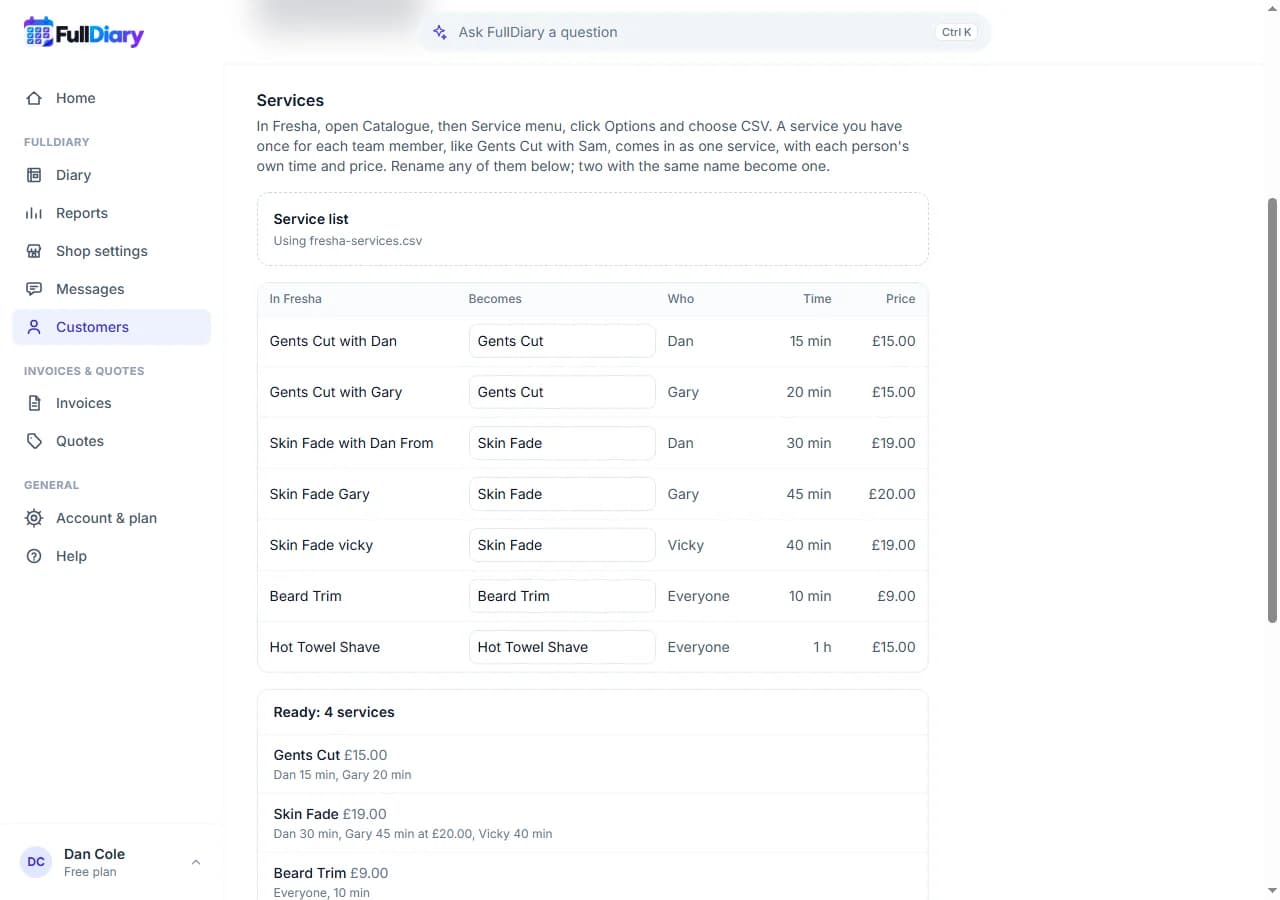
In Fresha, open Catalogue, then Service menu, click Options and choose CSV, and choose that file in the Services step. Add your team under Team and hours first, so each person's own time can be set.
When a barber is quicker or charges more, Fresha keeps a copy of the service for each of them, named after them: Gents Cut with Dan, Gents Cut with Gary. FullDiary has one Gents Cut, with each person's own time and price on it, so that is what you get. You see every Fresha service beside the service it becomes, and can rename any of them before you import; two with the same name become one. A service you already have by that name is left as it is.
Then your appointments
In Fresha, open Reports, then Appointments list, set the dates from today to the last day anyone is booked, click Options and choose CSV. Choose that file in the Appointments step, and check which of your services and team members each Fresha one is. The services you have just imported are picked for you.
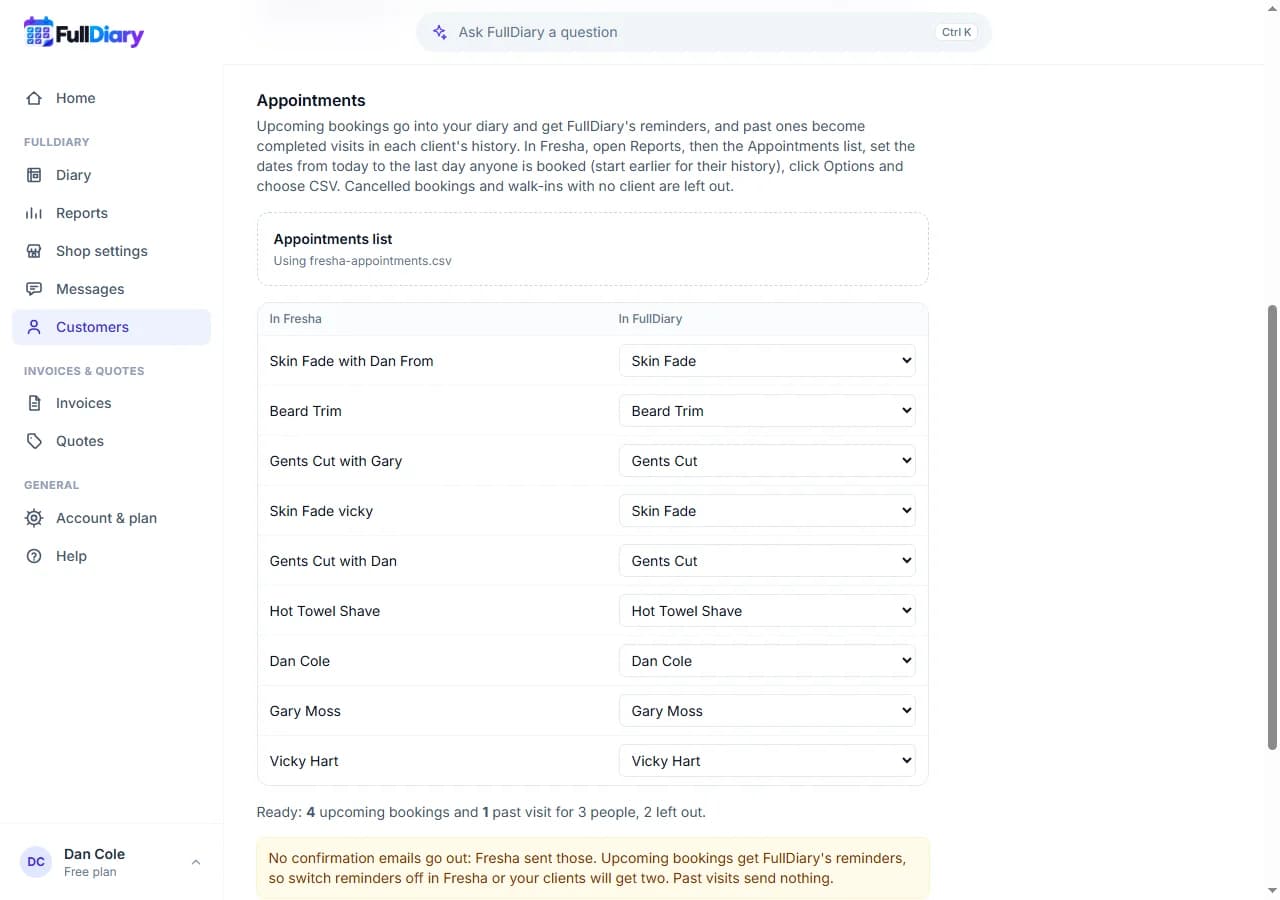
- One visit, one booking. A fade and a beard trim booked together in Fresha come in as one booking of two services, timed as they were, so your client gets one reminder.
- Their prices. Each booking keeps the price in Fresha's file. A prepayment is written on the booking's private note, and never charged again.
- Cancelled stays out. Cancelled appointments and walk-ins with no client on them are left out and listed.
- Nobody is emailed. No confirmations go out, because Fresha sent those. Your clients get FullDiary's reminders from then on, so switch reminders off in Fresha.
- Safe to run twice. Each booking remembers where it came from, so running the same file again adds nothing.
Setting it up
Open Customers, then Import customers, and choose Fresha. Start with the client list; if your clients are already in, choose Import services or appointments only. Importing is on every plan. On Free, one person takes bookings, so anyone else's appointments are listed and left out until you move to Pro and run the same file again, and upcoming appointments count towards the plan's 20 bookings a month, as bookings made in the diary do.
Questions people ask
- Which files do I need from Fresha?
- Three CSV files you download yourself: the client list from Clients, the service list from Catalogue, and the Appointments list report from Reports. The import page says where each one is.
- What happens to a service I have for each barber?
- Gents Cut with Dan and Gents Cut with Gary become one Gents Cut, with Dan's and Gary's own times and prices on it. You can rename any of them before you import.
- Do my clients get emails when I import?
- No. Nothing is sent when you import. Their reminders come from FullDiary from then on, so switch Fresha's off.
- What if a team member is not in FullDiary yet?
- Their appointments are left out and listed. Add them under Team and hours, then run the same appointments file again: bookings already in are skipped.
Read next
Written by
Matt SucklingDirector, FullDiary
Matt is a software engineer with over 15 years of experience. He started FullDiary to build a fairer booking system, and he still builds it himself.