
New feature3 minute read
Your own calendar now blocks the times you are busy
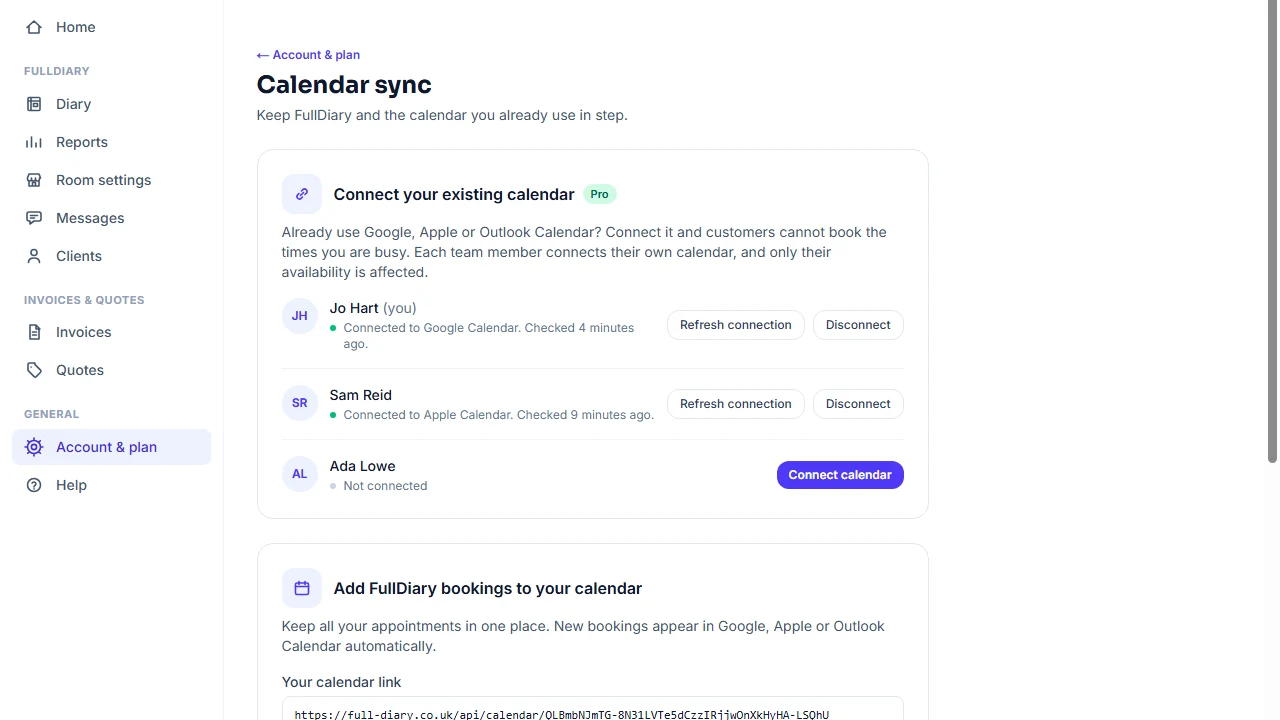
Connect your Google, Apple or Outlook calendar and anything you already have on stops being bookable. Your bookings still show in your calendar, so the two stay in step.

Director, FullDiary
FullDiary is the booking system for UK small businesses, with an online booking page, a diary and payments in one place. It has always been able to show your bookings in Google or Apple Calendar. Now it works the other way round too.
Most of us keep the rest of our life in the calendar on our phone. The dentist, the school run, a day off. Until now you had to block those times in FullDiary as well, or risk a customer booking over them. Connect your calendar and FullDiary does it for you.
How it works
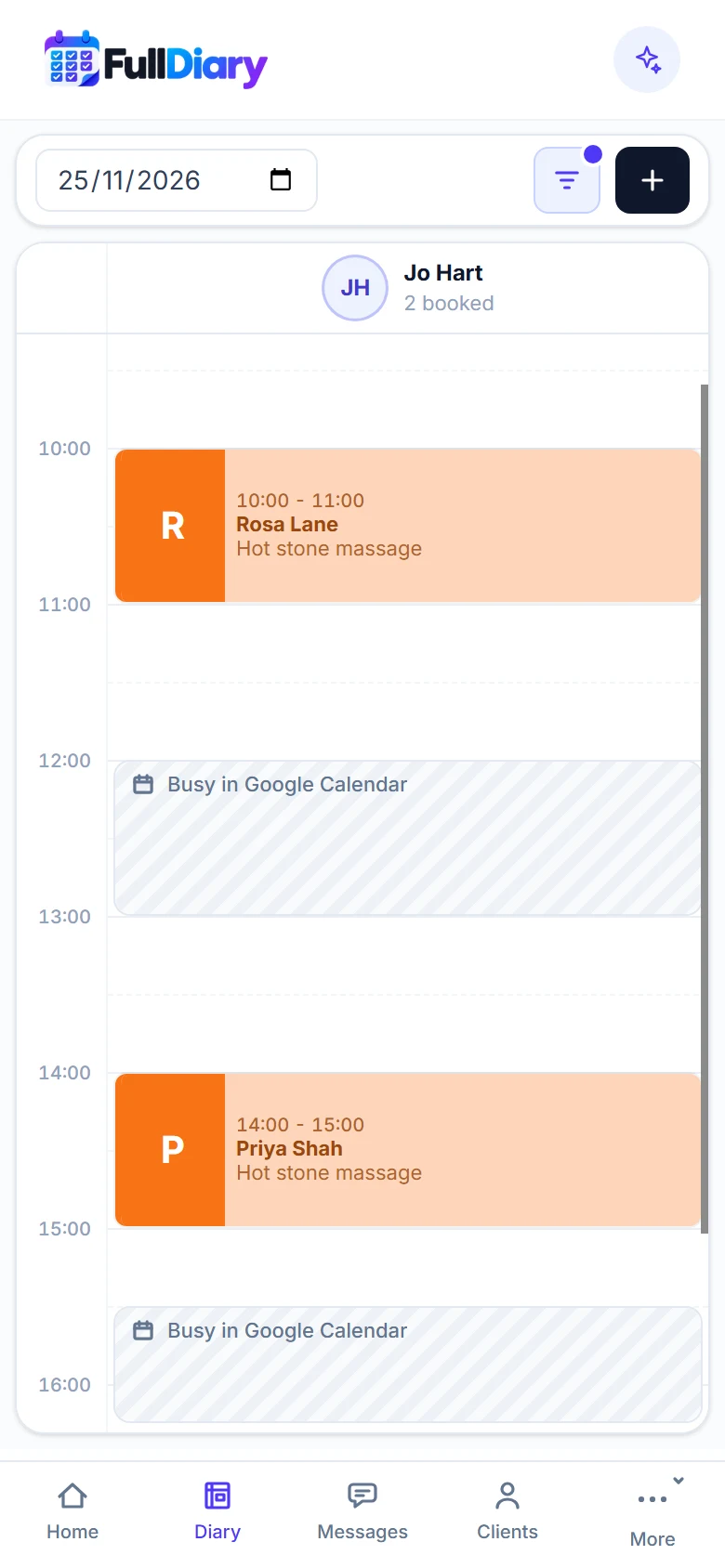
When your own calendar says you are busy, that time becomes blocked time in the diary, and your booking page stops offering it. Move or delete the event in your calendar and the time opens up again.
FullDiary checks your calendar every 15 minutes through the day and every hour overnight, so something new blocks the diary within a quarter of an hour.
It only reads when you are busy
FullDiary does not keep what an event is called, where it is or who is going. The diary shows the time as Busy in Google Calendar and nothing more, so your team can see that you are busy, not why.
Events you have marked as free block nothing. In Google that includes whole-day events such as birthdays, unless you set them to busy.
With a team
Each person connects their own calendar, and only their availability is affected. If one of you is at the dentist, customers can still book everyone else. Someone with their own login connects theirs under Your profile, and an owner or a manager can connect anyone's.
How to switch it on
Open Account & plan, then Calendar sync, and press Connect calendar beside your name. Choose Google, Apple or Outlook and the steps show you where that calendar keeps its link. Paste it in and press Connect calendar. FullDiary reads your calendar there and then and tells you how many busy times it found.
Where each calendar keeps its link
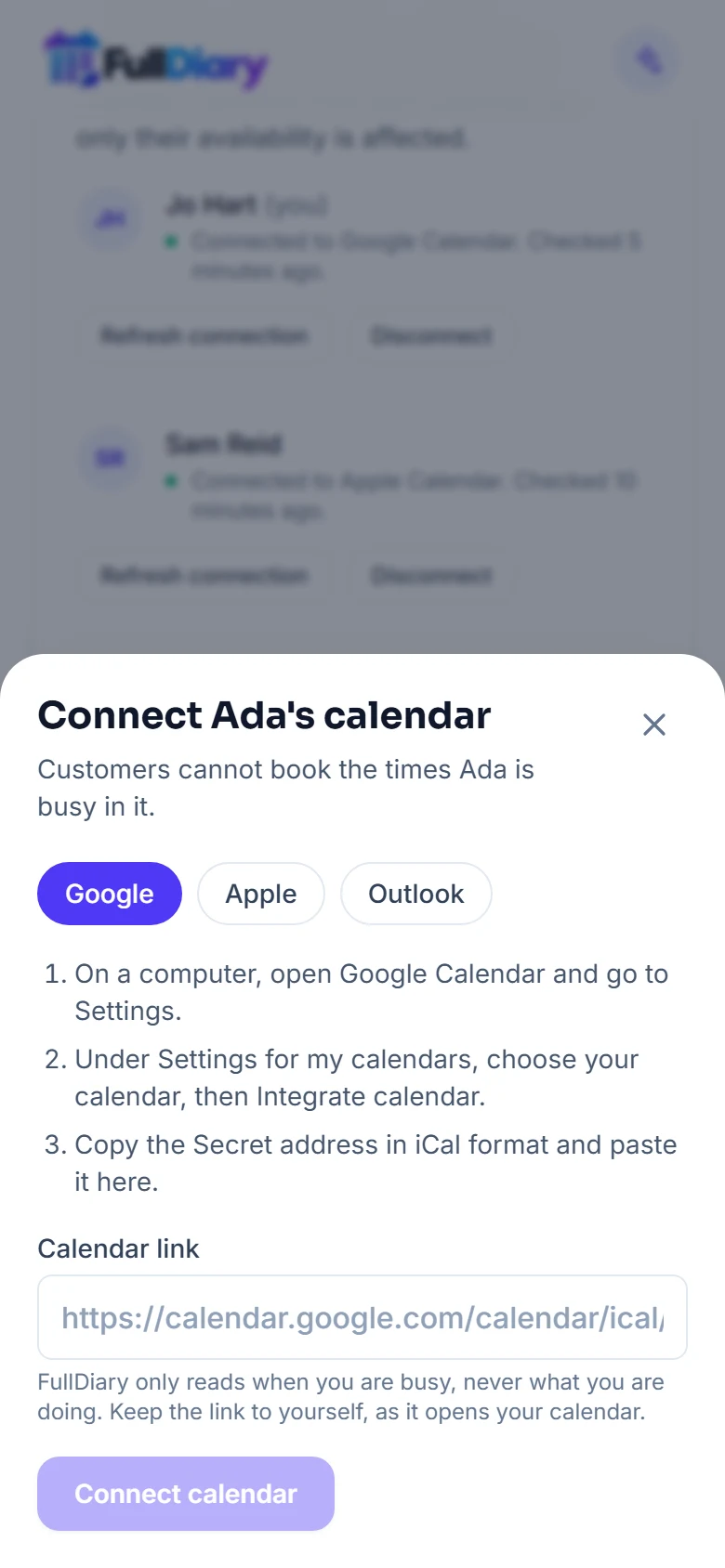
Treat the link like a password, as it opens your whole calendar to whoever has it. FullDiary never shows it again once it is saved.
Your bookings in your own calendar
The other direction is still there, on every plan. Add your calendar link to Google, Apple or Outlook Calendar and your bookings show there. Each person on your team can now have a link of their own as well, which shows only their bookings.
What it does not do yet
Busy times from your calendar are changed in your calendar, not in the diary. Moving an event in your calendar does not move a booking in FullDiary either, so keep booking and moving appointments in FullDiary, where your customer is told about the change.
A new event can take up to 15 minutes to block the diary. If a customer books in that gap, both show in the diary side by side, so you can see the clash.
In the app
Busy times from a connected calendar show in the diary in the FullDiary app straight away. Connecting a calendar from the app, on iPhone and Android, comes with its next update. Until then, connect it on the website.
Questions people ask
- Can Google Calendar block times in my booking system?
- Yes, with FullDiary on Pro. Connect your Google calendar under Account & plan, Calendar sync, and the times you are busy there cannot be booked.
- Does it work with Apple Calendar and Outlook?
- Yes. Paste the public link of an iCloud calendar, or the ICS link Outlook gives you when you publish your calendar.
- Can my staff connect their own calendars?
- Yes. Each person connects their own, and only their availability is affected, so customers can still book the rest of the team.
- Can FullDiary see what my appointments are?
- No. It reads when you are busy and keeps nothing else, so the diary only ever says Busy.
Read next
Written by
Matt SucklingDirector, FullDiary
Matt is a software engineer with over 15 years of experience. He started FullDiary to build a fairer booking system, and he still builds it himself.