
New feature3 minute read
Moving from Setmore? Your customers and appointments come with you
Download two files from Setmore and import them in one go. Your customers arrive with their notes, and every upcoming appointment lands in your diary at its time, its length and its price, with the address it is at.

Director, FullDiary
FullDiary is the booking system for UK small businesses, with an online booking page, a diary, reminders and your customers in one place. Moving from Setmore means bringing two things with you, your customers and the appointments already booked. Both come across from files you download from Setmore yourself.
Your customers
In Setmore on the web, open Customers, click Options under the blue + button and choose Export Customers. In FullDiary, open Customers, choose Import from a spreadsheet and pick Setmore from the list of systems, then choose the file. Every column is matched for you, and you see them all before anything is saved.
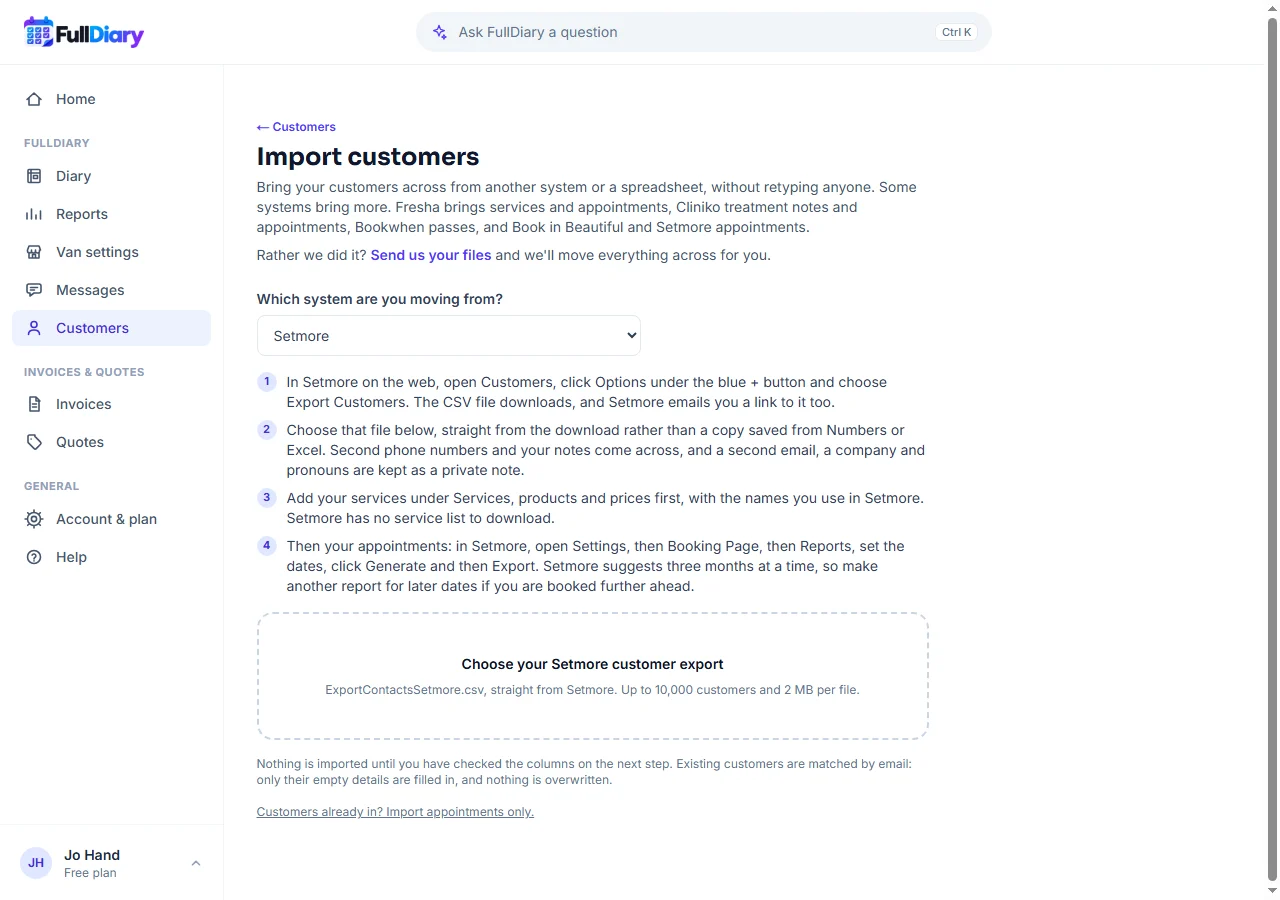
Names, emails, phone numbers and addresses go where you would expect. A second phone number is used when the first is empty. Your notes, a second email, a company and pronouns are kept as a private note on the customer, so nothing you wrote is lost.
Your appointments
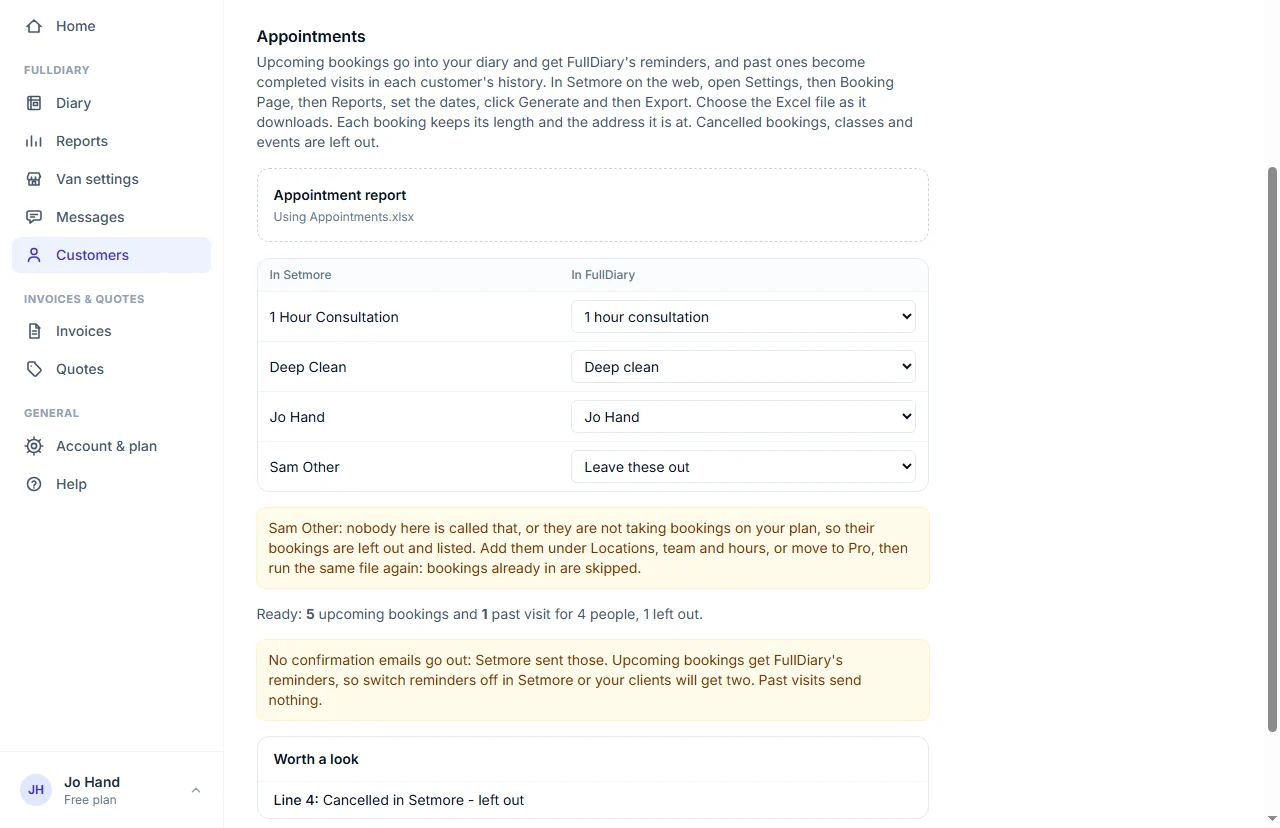
Setmore has no service list to download, so add your services in FullDiary first, with the names you use in Setmore. Then in Setmore open Settings, then Booking Page, then Reports, set the dates, click Generate and then Export. Setmore suggests three months at a time, so make another report for later dates if you are booked further ahead. Choose the Excel file as it downloads.
- The same time and length. A booking is as long here as it was in Setmore, so an hour's visit with twenty minutes after it still takes eighty minutes of your day.
- The same price. Each booking keeps the cost in Setmore's report. A free one stays free.
- The address it is at. If you go to your customers, the address on each Setmore booking is on the booking in your diary.
- Their comment. Anything the customer wrote when they booked comes across with the booking.
- Cancelled stays out. Appointments cancelled in Setmore are left out and listed, and so are classes and events.
- Nobody is emailed. No confirmations go out, because Setmore sent those. Reminders come from FullDiary from then on.
Before anything is saved you say which of your services each Setmore service is and who each team member is. Services with the same name are matched for you. Bookings that have already happened become visits in each customer's history.
Run it again whenever you like
Importing the same file twice adds nothing twice, so you can bring a later report in on the day you switch and only the new bookings are added. A booking you moved or cancelled in Setmore after importing it is not changed here, so change that one in your diary too. A time already taken in your diary is never doubled. Remember to switch reminders off in Setmore, so your customers do not get two.
Rather not do it yourself? Send us your two files and we will move everything across for you.
Questions people ask
- Which Setmore files do I need?
- Two. Your customers from Customers, Options, Export Customers, and your appointments from Settings, Booking Page, Reports. Setmore's reports work in a browser, not in its phone apps.
- Do my customers get an email when I import?
- No. Nothing is sent when you import. Their reminders come from FullDiary from then on, so switch Setmore's reminders off.
- What about my services?
- Setmore has no service list to download, so add them in FullDiary first. Give them the names you use in Setmore and the appointments match themselves.
- Does it cost anything?
- No. Importing is on every plan, including Free. Free takes 20 bookings a month, so a busy diary comes across in full on Pro.
Read next
Written by
Matt SucklingDirector, FullDiary
Matt is a software engineer with over 15 years of experience. He started FullDiary to build a fairer booking system, and he still builds it himself.