
FullDiary vs Goldie The simpler alternative to Goldie.
FullDiary does the part you live in - the booking page, the live diary, deposits, reminders, messages and forms - for 9.99 GBP a month a person, never more than 39.99 GBP however big the team. Here is the comparison, with Goldie's own prices in pounds, checked 5 November 2026.
- Fewer no-shows
- Set up in minutes
- No commission, ever
Free for 20 bookings a month. No card, no contract, no commission.
The numbers, side by side
Both columns, line by line.
Goldie has a free Starter plan for one user, Pro at 24.99 GBP a month for one calendar and Pro Plus at 49.99 GBP for a team. FullDiary's free plan sends its reminders for you, Pro is 9.99 a person, and a team never pays more than 39.99.
| FullDiary | Goldie | |
|---|---|---|
| Free plan | 20 bookings a month, for as long as you like - automatic reminders, messages and forms included | Starter, with 20 appointments a month for one user and manual appointment reminders |
| Reminders on the free plan | Sent for you by email the day before, or at the times you pick | Manual - their FAQ says Starter reminders 'are sent via your device and carrier' |
| One person, unlimited bookings | 9.99 GBP a month on Pro | 24.99 GBP a month on Pro, or 249.99 GBP a year |
| A team | 9.99 GBP a month a person - 19.98 GBP for two, and never more than 39.99 GBP | 49.99 GBP a month on Pro Plus, the plan with multiple team members and calendars, or 499.99 GBP a year |
| Forms before the visit | On every plan - asked on the booking page, with the answers on the client's record | Online forms are on Pro Plus |
| A waiting list | On every plan, the free one too | On Pro Plus |
| Your own colour on the booking page | On every plan | A custom theme colour is not on Starter; on Pro and Pro Plus |
| Invoices and quotes too | Included in Pro, with AI invoices and quotes and QuoteChaser follow-ups | Not on Goldie's pricing page |
Free plan
FullDiary
20 bookings a month, for as long as you like - automatic reminders, messages and forms included
Goldie
Starter, with 20 appointments a month for one user and manual appointment reminders
Reminders on the free plan
FullDiary
Sent for you by email the day before, or at the times you pick
Goldie
Manual - their FAQ says Starter reminders 'are sent via your device and carrier'
One person, unlimited bookings
FullDiary
9.99 GBP a month on Pro
Goldie
24.99 GBP a month on Pro, or 249.99 GBP a year
A team
FullDiary
9.99 GBP a month a person - 19.98 GBP for two, and never more than 39.99 GBP
Goldie
49.99 GBP a month on Pro Plus, the plan with multiple team members and calendars, or 499.99 GBP a year
Forms before the visit
FullDiary
On every plan - asked on the booking page, with the answers on the client's record
Goldie
Online forms are on Pro Plus
A waiting list
FullDiary
On every plan, the free one too
Goldie
On Pro Plus
Your own colour on the booking page
FullDiary
On every plan
Goldie
A custom theme colour is not on Starter; on Pro and Pro Plus
Invoices and quotes too
FullDiary
Included in Pro, with AI invoices and quotes and QuoteChaser follow-ups
Goldie
Not on Goldie's pricing page
Goldie prices and fees are rates in pounds read from heygoldie.com/pricing on 5 November 2026; they can change, so check their page before deciding. Goldie is a trademark of its owner. FullDiary is made by Cynical Software Ltd, an independent company not affiliated with or endorsed by Goldie.
The FullDiary column
Where FullDiary is better.
FullDiary is deliberately simpler. It is the booking page, the live diary, deposits, reminders, messages and forms, done properly - with the free plan doing the reminding for you.
Free reminders that send themselves
On FullDiary's free plan every booking gets its confirmation and reminder emails without you lifting a finger. Goldie's page says Starter's reminders are manual, sent from your own phone.
Unlimited bookings for less
One person on FullDiary Pro is 9.99 GBP a month. Goldie Pro, the plan with unlimited appointments, is 24.99 GBP.
A team without the jump
Adding a second person takes FullDiary Pro to 19.98 GBP a month, and it never goes above 39.99 GBP however many you add. On Goldie's page a team means Pro Plus, at 49.99 GBP a month.
Forms and a waiting list from day one
Patch tests, consent forms and the waiting list are on every FullDiary plan, the free one included. On Goldie's comparison both sit on Pro Plus.
Every claim above is the same enforced product the main FullDiary page sells, or the full matrix on the pricing page.
The real thing
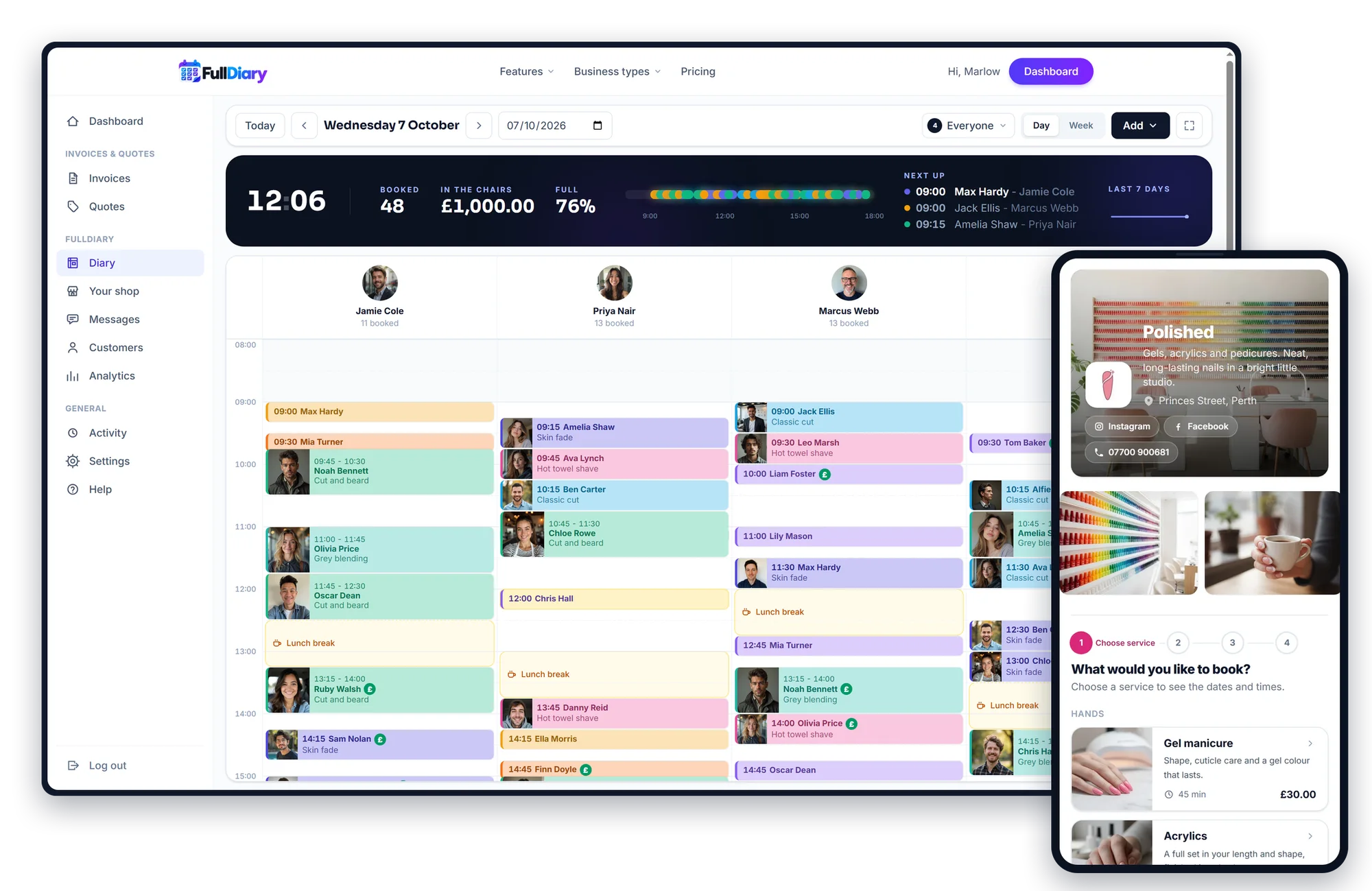
The screen your shop lives on.
Every picture on this page is a capture of the working product, taken from a shop running on FullDiary. This one is a recording.
Someone running late? Their booking moves to another column or time with a drag, and one tap emails the customer the new time. (A real screen recording.)
- Bookings move with a drag, and the emails follow
- Walk-ins go in by drawing across an empty space
- Done, no-show or cancelled, marked as you go
- One tap makes it full screen for the tablet by the till
Your booking page
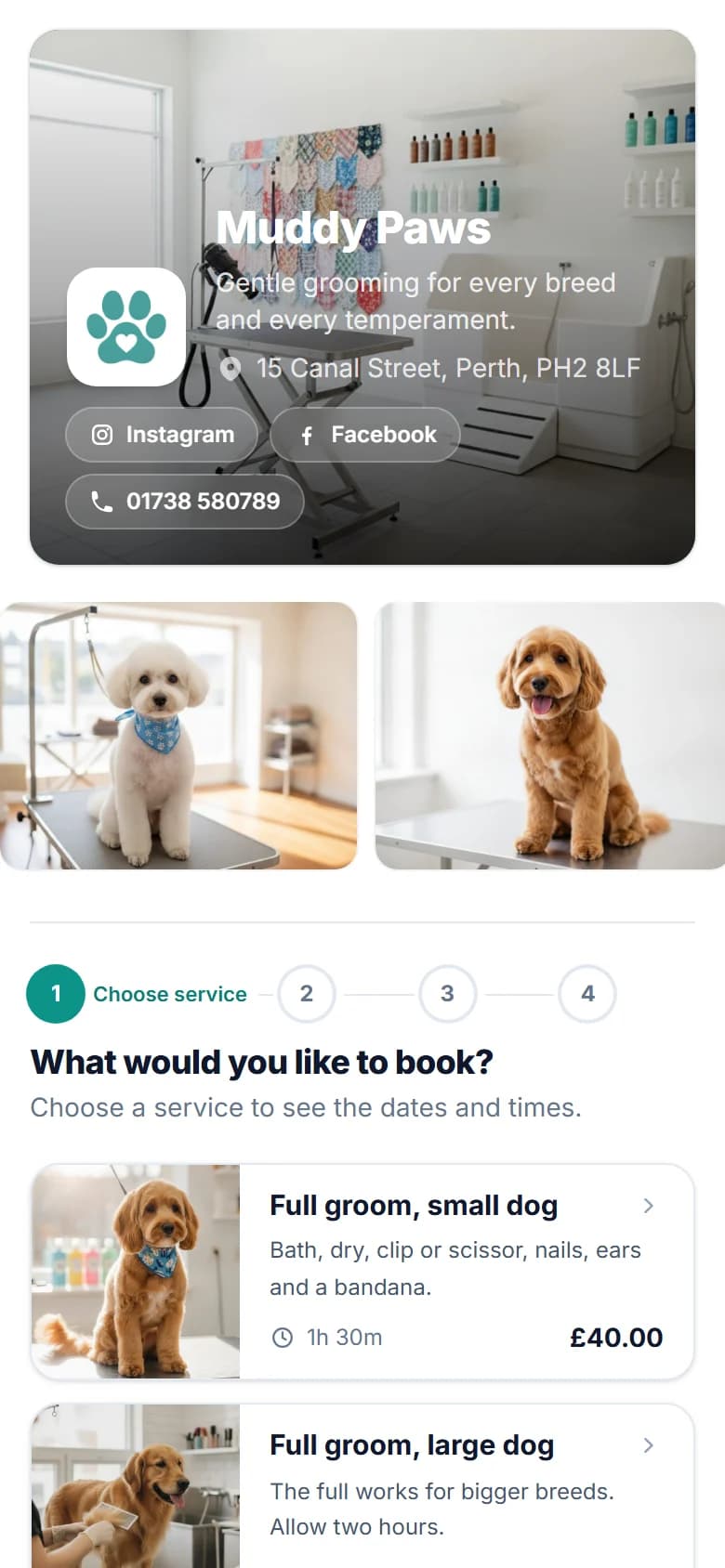
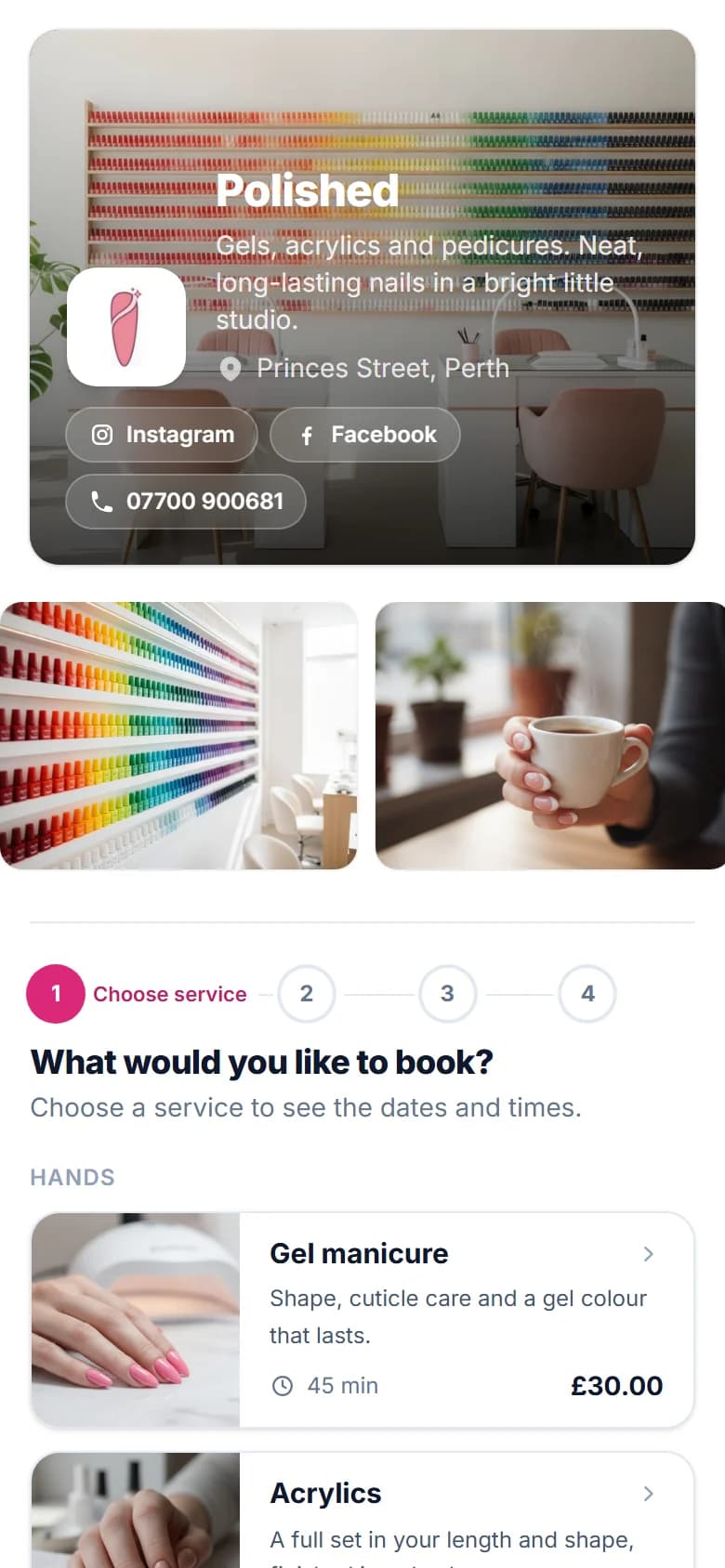
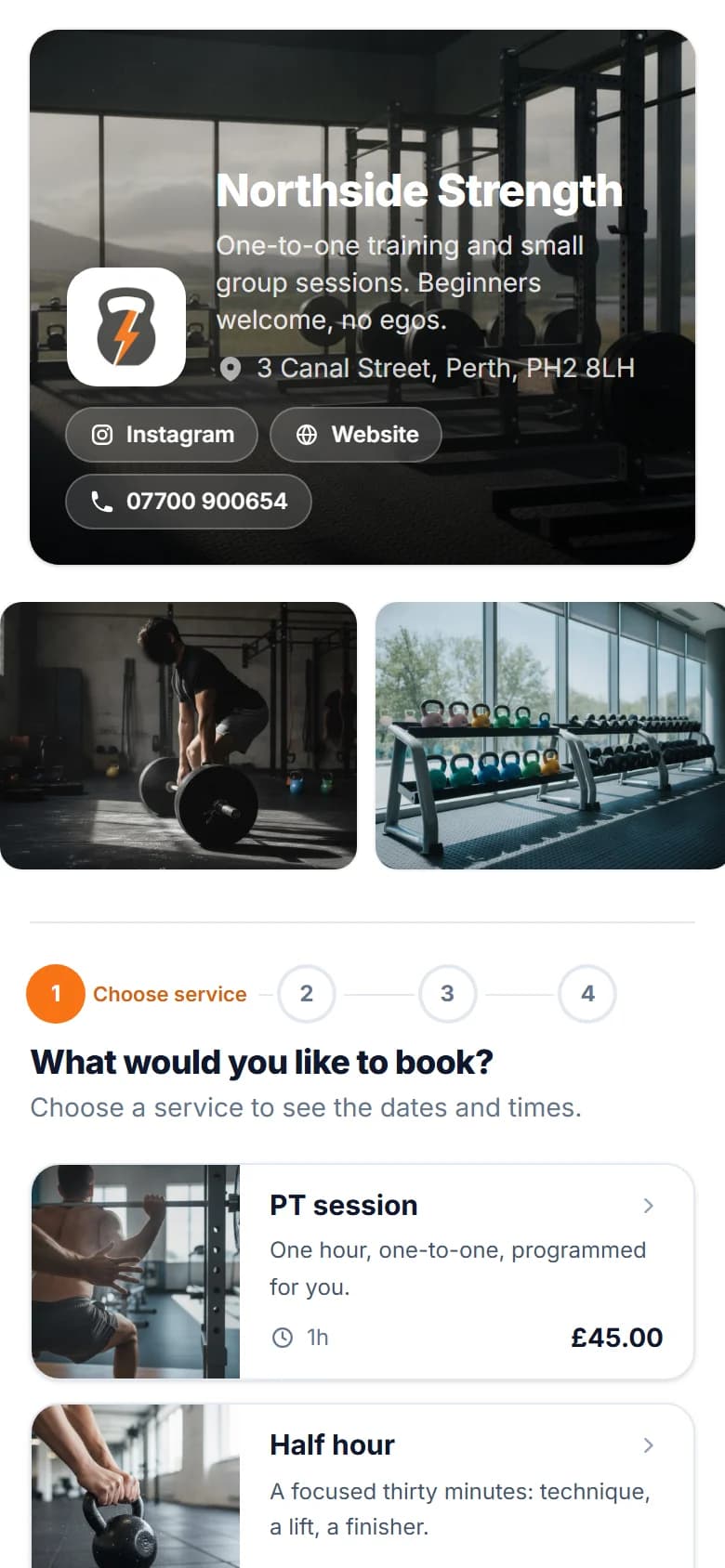
Your booking page. Your brand.
Make your booking page look like your business, not another generic booking app.
On every plan
- Your logo and brand colour
- Two designs, light or dark backgrounds
- A photo of your shop across the top
- Heading fonts and a note for your customers
On Pro
- A gallery of up to eight photos
- Instagram, Facebook, TikTok and website buttons
Savednow
Your page has its new look.
What comes with it
Everything in the FullDiary column.
The table prices the product. This is the product: every line below is live today, on the plans the pricing page says.
- A booking page in your coloursLogo, colour, photo, page style and font, with each person's photo and services. One link for the bio and the QR card.
- The live diaryEvery person a column, walk-ins drawn in, drag to move with the customer emailed, one tap to full screen for the screen by the till.
- Deposits into your own StripeA deposit or the full price as they book, on every plan. The slot is confirmed when it is paid and the money lands with you.
- Reminders on every planEmail the day before, or at the times you pick, and texts as well on Pro. Customers move or cancel their own booking from the confirmation.
- Messages, both waysMessage any booking, and they see it on their booking page and reply into your inbox. Every plan.
- Forms before the visitPatch test, consent, intake, pet details and more, asked on the booking page with a typed-name agreement. On the profile with a PDF.
- Visit records in your trade's fieldsColour formula, clipper grade, mileage, pain score, saved with each visit and there next time. Share with the customer if you choose.
- Two services, one visit, and a waiting listA cut and a beard in one booking. When a day is full, customers join the list and a cancellation offers them the slot.
- Packages and regulars on repeatSell a block of sessions paid up front on Pro. A regular's slot repeats itself weekly, fortnightly or every few weeks on every plan.
- Gift vouchersSold on your booking page or at the desk, emailed with a code, and spent on any booking until it runs out. On Pro.
- Discount codesWELCOME10 for a first visit or a code for a quiet Tuesday, off a booking or a package, with the limits you set. On Pro.
- Classes and group sessionsA bootcamp or a workshop on a timetable with a set number of places, booked one place at a time, with a waiting list when it is full. On every plan.
- Travel charges for mobile workGo to your customers? On Pro, your own price per mile goes on each booking, from the real driving distance, before they book.
- A login for everyone, with a ceilingEach person gets their own login and sees the day on their own phone. Pro is 9.99 GBP a month a person and never more than 39.99 GBP, so once you have four people, a new junior does not raise the bill.
- Reviews on your booking pageCustomers review a real visit from the thank-you email, and your stars show under your name. Every plan.
- No-show fees on a saved cardCustomers save a card as they book and see your fees first. You charge one only for a no-show or a late cancellation. Every plan.
- Jobs that take two of youA service can need two or more of your team, booked into each of their columns at once. On Pro.
- They come backA rebook reminder when the next visit is due and a review ask with your Google link, one email each.
- Bookings become invoicesOne click on the diary card turns a finished booking into a draft invoice. Quotes on the same login.
- The numbers, without a spreadsheetMoney in the book for the next 30 days, takings, busiest hours and what no-shows cost, live on the overview.
- The phone app, iPhone and AndroidFullDiary on the App Store and Google Play: the diary, messages, customers, invoices and reports in your pocket, with a push the moment a booking lands.
If you switch
An afternoon, start to finish.
- 01
Answer six quick questions
Your trade fills in the services, hours, forms and booking rules, and you change anything you like before going live. Your logo and colour can follow whenever you want. No card, and the free tier does not expire.
- 02
Bring your customer list
Your client list comes across as a CSV, with names, numbers, emails, birthdays and addresses. You check the columns first, nobody is added twice, and it is free on every plan.
- 03
Put your link where clients already find you
Google Business Profile, Instagram bio, the QR card by the mirror. Your regulars book the same shop at the same address - just without ringing you.
- 04
Run the day on the live diary
Walk-ins typed straight in, drag a booking when someone runs late, and every staff member sees the day on their own phone.
Bookings already made in Goldie can finish there, or go into the FullDiary diary in a few taps with your regulars set to repeat; new ones come through your FullDiary link. Gift vouchers you sold before keep their code and what is left on them (on Pro), and anyone you type in once prefills forever.
FAQs
Questions about switching
What it costs, what happens to your clients, and how the switch works.
Something else on your mind? Ask us.
Is FullDiary affiliated with Goldie?
No. FullDiary is made by Cynical Software Ltd, an independent UK company, and this page is not endorsed by Goldie. The Goldie prices quoted were read from their public pricing page, as shown in pounds to a UK visitor, on 5 November 2026; their page says prices may differ by country and prices change, so check heygoldie.com/pricing before deciding anything.
Both have a free plan. What is the difference?
Both cover 20 bookings a month for one person. On FullDiary's free plan the confirmation and reminder emails go out by themselves, and forms, messages and the waiting list are included. Goldie's page says Starter's reminders are manual and sent from your own device, and puts online forms and the waitlist on Pro Plus.
Can I import my client list from Goldie?
Yes. Your clients come across from a CSV, with names, phone numbers, emails, dates of birth and addresses. The column mapping is shown so you can correct it, anyone already in FullDiary is matched rather than added twice, and any skipped row is reported with its line number. Nobody retypes 800 clients, and the import is free on every plan.
What about the bookings and gift vouchers I already have?
Bookings already made in Goldie can finish there, or go into the FullDiary diary in a few taps, and a regular's slot can repeat weekly, fortnightly or every few weeks so it keeps itself. Gift vouchers your business sold before can be issued in FullDiary as Bought before FullDiary, keeping the old code, what is left on it and its use-by date (gift vouchers are on Pro). Old reminders are best switched off for anyone you move across, so nobody gets two. Moving to FullDiary, step by step
Do patch tests and consent forms come with it?
Yes, on every plan. The patch test, consent and intake templates are ready-made, and are asked on the booking page before the visit with a typed-name agreement. Every answer sits on the client's profile with a PDF. A patch test a client already had with you before the move can be marked as done for them, so they are not asked again until the date you choose.
What happens to the money when a client pays a deposit?
It lands in your own Stripe account - FullDiary never holds it. Stripe's standard processing rates apply and go to Stripe; FullDiary adds nothing on top and takes no commission on bookings, ever.
Is there an app, like Goldie's?
Yes. The FullDiary app is on the App Store for iPhone and on Google Play for Android, on every plan, and FullDiary also runs in the browser on any phone, tablet or computer.
Compared the same way: FullDiary vs Fresha, FullDiary vs Booksy, FullDiary vs Treatwell, FullDiary vs Slick, FullDiary vs Timely and FullDiary vs Ovatu.